Building LLM Memory from Scratch: Knowledge-Graph Memory
Introduction: Vectors Can't Walk Paths
When people first learn about LLM memory, they usually hear about vector search. A vector is just a list of numbers that represents the meaning of a piece of text. This helps a model find text that is semantically similar - in other words, text that "sounds related in meaning," even if the exact words are different.
That is very useful. But it has a big limit.
Vector search is great at answering questions like:
- "Find notes similar to this topic"
- "Show me documents about database outages"
- "Retrieve chunks related to Alice's work"
What it does not do naturally is walk relationships step by step.
For example, imagine these facts:
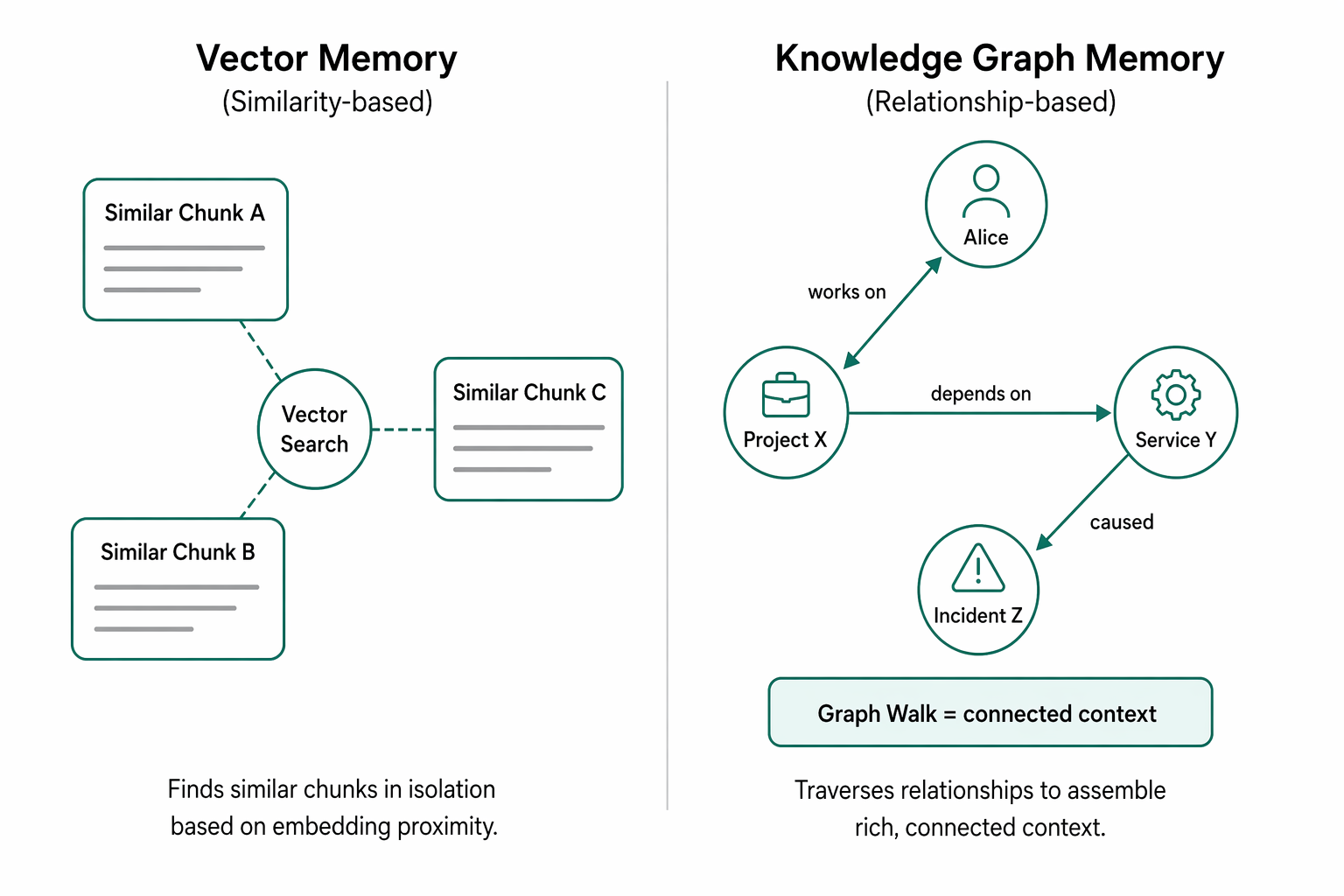
- Alice works on Project X
- Project X depends on Service Y
- Service Y caused Incident Z
A vector database may retrieve chunks that mention Alice, Project X, or Incident Z because the text is related. But it does not automatically understand the path:
- Alice -> Project X -> Service Y -> Incident Z
That path matters. It is not just similarity. It is structure.
A simple analogy: think about a student trying to understand why they failed a lab.
- The student was in Course A
- Course A required Lab B
- Lab B needed Software C
- Software C was broken before submission
If you search by similarity, you may find notes about the course, the lab, or the broken software. But you still need to connect them in the correct order to explain what happened.
This is where graph memory becomes important. A graph stores information as:
- Nodes: things like people, projects, services, courses
- Edges: relationships like "works on," "depends on," or "caused"
For LLM agents, this matters because many real tasks need multi-hop context - meaning the answer comes from following several linked facts, not just finding one similar paragraph.
Graph memory helps the model move from "this looks related" to "this is connected for a reason."
Knowledge Graphs & The "Map" Analogy
Think of a knowledge graph like a city map or a campus map.
On a map, you don't just store random facts. You store places and how those places are connected. A library is near the cafeteria. A professor works in the science building. A student belongs to a lab. That structure is what makes a knowledge graph powerful.
Here are the basic pieces in plain language:
-
Node / Entity: a thing on the map.
Examples:Alice,CS101,Professor Lee,Library. -
Edge / Relation: a connection between things.
Examples:Alice ENROLLED_IN CS101,Professor Lee TEACHES CS101. -
Label / Type: the category of a thing or connection.
Examples:Aliceis aStudent,CS101is aCourse. -
Property: extra details about a thing.
Examples: a student's major, a course's room number, a professor's email. -
Path: a route through connected nodes.
Example:Alice -> ENROLLED_IN -> CS101 -> TAUGHT_BY -> Professor Lee.
This helps answer multi-step questions, like "Who teaches the course Alice is taking?"
In LLM memory, this acts like a structured memory map. Instead of storing one big paragraph saying "Alice takes CS101 and Professor Lee teaches it," the model can store separate facts and connect them. That makes updates easier and reasoning clearer.
A tiny example:
(Student: Alice) --ENROLLED_IN--> (Course: CS101)
(Course: CS101) --TAUGHT_BY--> (Professor: Lee)
(Professor: Lee) --OFFICE_IN--> (Building: Science Hall)
Why this is different from other memory styles:
-
Compared with a plain note list:
- Notes store facts as chunks of text
- Graphs store facts as connected pieces
- Graphs are easier to query step-by-step
-
Compared with a vector database:
- Vectors are great for similarity search ("find related text")
- Graphs are great for relationship search ("who knows whom?")
- Vectors find similar meaning; graphs track explicit links
So, if vector memory is like "searching documents," graph memory is like "following roads on a map." For LLMs, that map can become a reliable way to remember people, objects, events, and how they all connect.
The Architecture in One Picture
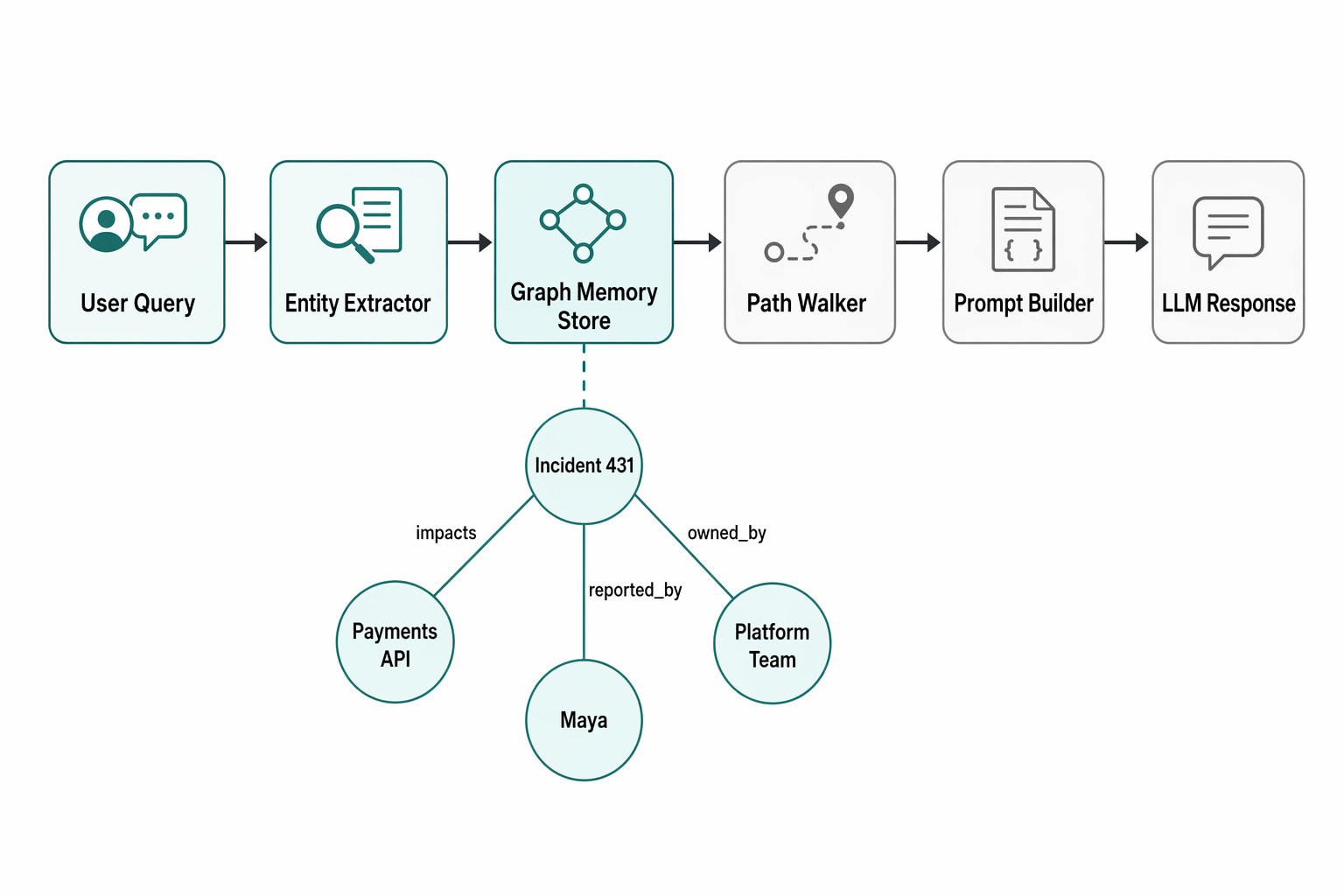
Think of the system like a smart note-taking map for an LLM. Instead of storing memory as one big block of text, we break it into entities (things like people, places, projects, dates) and relationships (how those things connect). That map becomes a knowledge graph.
Here's the full flow in one readable text diagram:
User Query
   v
Entity Extractor
   v
Graph Memory Store
   v
Path Walker / Retriever
   v
Prompt Builder
   v
LLM Response
A slightly richer version looks like this:
[User Query: "What do you remember about my startup idea with Maya?"]
        v
[Entity Extractor: finds "startup idea", "Maya"]
        v
[Graph Memory Store: nodes + edges already saved from past chats]
        v
[Path Walker / Retriever: follows links around Maya, startup, goals, timeline]
        v
[Prompt Builder: combines query + retrieved facts into a clean prompt]
        v
[LLM: generates grounded response]
Here's what each part does:
-
User Query
This is the question or message from the user. It starts the whole process. -
Entity Extractor
An entity is a named thing or important concept. This step pulls key items from the query, like names, companies, topics, or events. -
Graph Memory Store
This is the long-term memory database. It stores:- Nodes = entities
- Edges = relationships
Example:Maya -> works_on -> startup idea
-
Path Walker / Retriever
This component explores the graph. It starts from the extracted entities and walks through useful nearby connections. Like following roads on a map, it finds related facts without reading everything. -
Prompt Builder
It turns retrieved facts into a compact prompt the LLM can understand. This is important because LLMs work best when memory is organized and relevant. -
LLM Response
Finally, the model answers using the retrieved graph facts, so the response is more accurate and personalized.
In real production systems, this is often hybrid:
- Graph retrieval finds structured relationships
- Vector retrieval finds semantically similar text snippets
Using both gives the best of both worlds: explicit connections + fuzzy similarity.
Algorithm & Code: Walk-through
A good way to understand knowledge-graph memory is to build a tiny one yourself.
A knowledge graph is a memory structure made of:
- Entities: important things, like a person, project, or incident
- Relationships: links between things, like "owns," "worked_on," or "blocked_by"
Instead of storing memory as one long note, we store facts as connected pieces. That makes it easier to retrieve only the relevant context for an LLM prompt.
# Minimal knowledge-graph memory for an LLM
# No external packages required

class KnowledgeGraphMemory:
    def __init__(self):
        self.entities = {}   # entity_id -> {"type": ..., "name": ...}
        self.edges = []      # (source, relation, target)

    def add_entity(self, entity_id, entity_type, name, **attrs):
        self.entities[entity_id] = {
            "type": entity_type,
            "name": name,
            **attrs
        }

    def add_relation(self, source, relation, target):
        if source in self.entities and target in self.entities:
            self.edges.append((source, relation, target))

    def neighbors(self, entity_id):
        results = []
        for s, r, t in self.edges:
            if s == entity_id:
                results.append((r, t))
            elif t == entity_id:
                results.append((f"reverse:{r}", s))
        return results

    def traverse(self, start_id, max_hops=2):
        visited = set([start_id])
        queue = [(start_id, 0)]
        found = []

        while queue:
            current, depth = queue.pop(0)
            if depth == max_hops:
                continue

            for relation, neighbor in self.neighbors(current):
                if neighbor not in visited:
                    visited.add(neighbor)
                    queue.append((neighbor, depth + 1))
                    found.append((current, relation, neighbor))
        return found

    def assemble_context(self, focus_entity_id, max_hops=2):
        lines = []
        focus = self.entities[focus_entity_id]
        lines.append(f"Focus: {focus['type']} '{focus['name']}'")

        facts = self.traverse(focus_entity_id, max_hops=max_hops)
        for src, rel, dst in facts:
            src_name = self.entities[src]["name"]
            dst_name = self.entities[dst]["name"]
            lines.append(f"- {src_name} --{rel}--> {dst_name}")

        return "\n".join(lines)


# -------------------------
# Example: incident/project/team memory
# -------------------------
kg = KnowledgeGraphMemory()

# Entities
kg.add_entity("incident_431", "Incident", "Payment API latency spike", severity="high")
kg.add_entity("project_atlas", "Project", "Atlas Checkout")
kg.add_entity("team_platform", "Team", "Platform Team")
kg.add_entity("team_sre", "Team", "SRE")
kg.add_entity("person_maya", "Person", "Maya")
kg.add_entity("service_payments", "Service", "Payments API")
kg.add_entity("doc_rca", "Document", "RCA Draft")

# Relationships
kg.add_relation("incident_431", "impacts", "service_payments")
kg.add_relation("service_payments", "owned_by", "team_platform")
kg.add_relation("incident_431", "reported_by", "person_maya")
kg.add_relation("incident_431", "related_to", "project_atlas")
kg.add_relation("team_sre", "assisting_with", "incident_431")
kg.add_relation("doc_rca", "documents", "incident_431")

# Insert new memory after an update
kg.add_entity("change_102", "Change", "Enabled DB connection pooling")
kg.add_relation("change_102", "mitigated", "incident_431")

# Path traversal from the incident
print("TRAVERSAL:")
for fact in kg.traverse("incident_431", max_hops=2):
    print(fact)

# Context assembly for an LLM prompt
context = kg.assemble_context("incident_431", max_hops=2)

prompt = f"""
You are an engineering assistant.
Use the memory context below to answer the user's question.

Memory Context:
{context}

User Question:
What teams are involved in the payment latency incident, and what changed to mitigate it?
"""

print("\nLLM PROMPT:")
print(prompt)
Here's what matters most in the code:
entitiesandedgesare the core memory.entitiesstores the nodesedgesstores the connections
add_entity()andadd_relation()are the memory insertion steps. This is how new facts enter the system.neighbors()lets us move through the graph in both directions. That is useful because memory is often connected indirectly.traverse()does a small breadth-first search (BFS). BFS means exploring nearby nodes first, hop by hop.assemble_context()turns graph facts into plain text an LLM can read.
Why this works well:
- It keeps memory structured
- It avoids dumping every note into the prompt
- It gives a professional starting point you can later extend with timestamps, confidence scores, or relation weights
Think of it like a company org chart mixed with an incident timeline: connected facts are easier to follow than a giant paragraph.
Hands-On Results & Trade-offs
When you try a small knowledge-graph memory demo, the results are usually easy to see. Instead of storing memory as one big chunk of text, you store it as nodes (things like people, projects, places) and edges (connections like "works_on" or "likes"). That means your system can answer questions by following relationships, not just by matching similar words.
In practice, you should expect results like these:
- Cleaner fact recall for structured questions
- "Who works with Maya?"
- "Which project uses PostgreSQL?"
- Better multi-step reasoning
Multi-hop means the system answers by taking more than one step through the graph.
Example: Maya -> works_on -> Atlas -> uses -> PostgreSQL - More transparent answers
You can often show the exact path used to answer the question.
A tiny demo might look like this:
# Example graph path
Maya -> works_on -> Atlas
Atlas -> uses -> PostgreSQL
From that, the model can answer: "Maya works on a project that uses PostgreSQL."
That is where graph memory shines. It is great when relationships matter more than wording.
Here is the quick comparison:
-
Graph memory
- Best for connected facts
- Strong at multi-hop queries
- Easier to inspect and debug
- Harder to build and maintain
-
Vector memory
- Stores text as embeddings, which are number-based meaning representations
- Best for fuzzy recall, like finding related notes even when wording changes
- Simpler to set up
- Weaker at exact relationship tracing
-
Hybrid memory
- Combines both
- Use vectors to find relevant text, then graphs to reason over facts
- Often the most practical real-world choice
The biggest trade-off is construction cost. A graph is only as good as its extraction pipeline. You must choose a schema, extract entities and relations, merge duplicates, clean errors, and keep everything updated. For students, this means more work but better learning. For professionals, it means graph memory is powerful when your product needs traceable relationships, while vector memory is often enough for fast semantic search.
Conclusion/Next Stop: Hierarchical Self-Managed Memory
Knowledge-graph memory gives an LLM a better way to store and use connected facts. Instead of treating memory like a long flat list of notes, it represents information as entities (things like people, places, or concepts) and relations (how those things connect). That structure matters when the model needs to answer questions like "Who worked with whom?", "What caused this event?", or "How are these ideas related?"
In practice, this kind of memory helps in a few important ways:
- Better reasoning: The model can follow links between facts instead of guessing from nearby text.
- Less duplication: Shared facts can connect to many ideas without being stored over and over.
- Clearer updates: If one fact changes, you can update the node or edge instead of rewriting many summaries.
- More interpretable memory: A graph is easier to inspect than hidden internal weights or a pile of unrelated chunks.
A simple way to think about it is this: a flat memory is like a box of index cards, while a knowledge graph is like a map. Both contain information, but the map makes relationships visible. And for reasoning, those relationships are often the whole point.
Still, knowledge-graph memory is not the final step. Real systems also need to manage scale, importance, and abstraction. Not every detail should live forever at the same level. Some facts should stay specific, while others should be compressed into higher-level summaries.
That leads naturally to the next stop: hierarchical self-managed memory. This is memory that can organize information into layers - raw details, grouped episodes, summaries, and long-term knowledge - rather than storing every fact in one flat structure. In the next section, we'll look at how an LLM can begin to choose what to keep, what to merge, and what to summarize as its memory grows.
Related Topics
Related Resources
AI Safety Failures in LLM, RAG, and Agent Systems: Long-Horizon Risks, Root Causes, and Practical Mitigations
Research-grade guide to AI safety failures in LLM, RAG, and agents: causes, evaluations, long-horizon risks, mitigations, and practice.
articleRAG Systems
The blog helps you in implementing and using RAG which is most popular LLM application
articleAgentic AI - Complete Guide
The blog gives you complete inderstanding of AI Agents