Agentic AI for Real-World Builders: Architecture, Tradeoffs, and a Practical Implementation Guide
Agentic AI has quickly moved from research demos into production discussions. For teams building AI products, the appeal is obvious: instead of asking a model for a single answer, you give it a goal, access to tools, and enough control to plan, act, and adapt. That can unlock higher-value workflows such as customer support resolution, internal operations automation, claims processing, security triage, or sales research.
But the engineering reality is more complicated than the hype. Agentic systems introduce orchestration, failure modes, latency, cost, governance, and evaluation challenges that do not appear in simple chatbots or standard retrieval-augmented generation (RAG) pipelines. This article explains what Agentic AI actually means, how it differs from “normal” LLM applications and RAG, what architecture patterns matter in production, and how to implement a practical agent workflow with planning, tool use, memory, human review, guardrails, and evaluation.
What Agentic AI Means in Practice
An agentic AI system is an application where an LLM is not limited to producing a single response from a prompt. Instead, it participates in a control loop that can:
- interpret a goal
- plan intermediate steps
- choose and invoke tools
- observe results
- update state or memory
- decide whether to continue, ask for clarification, escalate, or stop
The key distinction is goal-directed execution over multiple steps. In a standard LLM app, the model answers directly. In an agentic app, the model helps drive a workflow.
A useful mental model is this:
- LLM app: “Answer this question.”
- RAG app: “Answer this question using retrieved documents.”
- Agentic app: “Achieve this business task using tools, memory, policies, and potentially multiple rounds of reasoning and action.”
That does not mean every multi-step workflow needs a fully autonomous agent. In fact, many successful production systems are constrained agents: they act within a narrow domain, with explicit tools, strict policies, and human checkpoints.
Agentic AI vs. Standard LLM Apps vs. RAG
The terms are often blurred, so it helps to separate them clearly.
| Pattern | Primary job | Typical flow | Strengths | Weaknesses |
|---|---|---|---|---|
| Standard LLM app | Generate text from prompt | User input → LLM → response | Fast to build, low orchestration complexity | Hallucinations, no external action, weak statefulness |
| RAG app | Answer grounded in data | User input → retrieve docs → LLM → response | Better grounding, enterprise knowledge access | Usually still single-turn and answer-oriented |
| Agentic AI app | Complete a task using reasoning and actions | Goal → plan → tool calls → observations → revised actions → result | Automates workflows, handles multi-step tasks | Higher risk, cost, latency, orchestration complexity |
RAG is often a component inside an agent, not a competing pattern. For example, an internal procurement agent might retrieve policy documents through RAG, then use structured tools to open tickets, verify budget approvals, and request manager review.
The important takeaway is that agentic AI is not “just better prompting.” It is a systems design problem involving state, control flow, tools, and governance.
Where Agentic AI Fits in Real Products
Agentic designs are most valuable when work is:
- multi-step
- partially structured
- dependent on external systems
- repetitive but variable
- high enough value to justify orchestration complexity
Typical use cases include:
- support agents that diagnose issues, search documentation, create tickets, and draft customer replies
- finance assistants that reconcile records, explain mismatches, and route exceptions
- security copilots that gather context from logs, summarize alerts, and propose containment steps
- sales research assistants that compile account notes, CRM context, and recent news before meetings
- operations assistants that coordinate workflows across email, ticketing, and internal systems
A poor use case is a simple FAQ bot. If the job is only to answer questions from a known document corpus, a well-built RAG system is usually simpler, cheaper, and safer.
Core Agentic Architecture
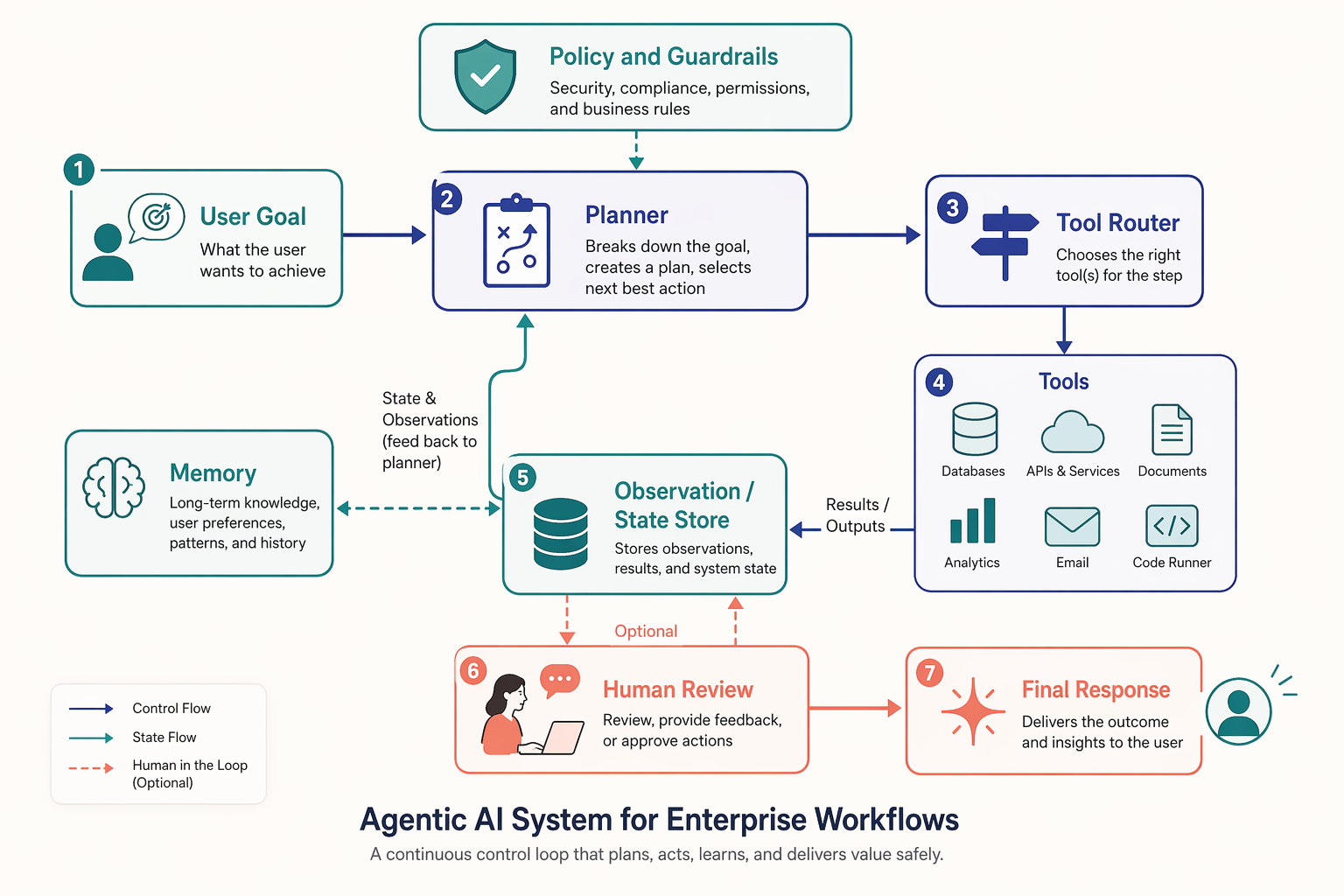
A production agent is usually built from several explicit components rather than one “magic” model call.
Core components
A practical architecture often includes:
-
User interface or API layer
Accepts the task, user identity, tenant context, and permissions. -
Planner or orchestrator
Decides the next step: respond, retrieve context, call a tool, ask a question, or escalate. -
Tool layer
Structured functions for external actions such as database queries, CRM lookup, ticket creation, email draft generation, or search. -
Memory and state store
Tracks session context, previous actions, intermediate results, and approved facts. -
Guardrails and policy checks
Validate inputs, constrain outputs, enforce tool permissions, redact sensitive data, and detect risky actions. -
Human-in-the-loop controls
Insert approvals for high-impact actions such as sending emails, issuing refunds, or changing records. -
Evaluation and observability stack
Logs traces, tool calls, latency, costs, outcomes, and failure patterns.
The architecture is not just about making the model smarter. It is about making the workflow inspectable and governable.
Planning: The Difference Between Chat and Task Execution
Planning is where agentic systems begin to feel qualitatively different from ordinary LLM apps. The model is not only generating language; it is deciding what to do next.
In practice, planning can be implemented at different sophistication levels:
- Implicit planning: the model chooses the next tool in each iteration
- Explicit plan generation: the model first produces a structured plan, then executes steps
- Workflow graph execution: deterministic pipelines with model decisions only at selected points
- Hierarchical planning: one model decomposes the task while another handles sub-tasks
For production systems, fully open-ended planning is often unnecessary. A more reliable approach is bounded planning inside a state machine. For example, a support agent may be allowed to move through these states only:
- classify issue
- retrieve customer account context
- search knowledge base
- draft solution
- request human approval if confidence is low
- create ticket if unresolved
This gives you most of the value of agentic behavior without unrestricted autonomy.
Tool Use: Where Agents Become Operational
Tools are what make an agent useful beyond text generation. A tool can be any structured function with defined inputs and outputs. Good tools are narrow, typed, and observable.
Examples include:
search_kb(query)get_customer_account(customer_id)create_support_ticket(subject, priority, summary)lookup_order(order_id)draft_email(to, subject, body)
Tool design matters more than many teams expect. If your tools accept ambiguous free text and return inconsistent data, the agent becomes brittle. Production tools should have:
- clear schemas
- limited side effects
- permission checks
- retries and timeouts
- audit logging
The rule of thumb is simple: let the model decide when to use a tool, but make software define how the tool behaves.
Memory: Short-Term State vs. Long-Term Knowledge
Memory is another overloaded term. In production, it helps to separate at least three kinds:
| Memory type | Purpose | Examples |
|---|---|---|
| Working memory | Current task state | retrieved docs, tool outputs, pending plan |
| Session memory | User conversation continuity | prior requests, selected preferences |
| Long-term memory | Durable facts for future tasks | account preferences, approved business rules, prior resolutions |
Many agent failures come from treating memory as an unbounded chat transcript. That leads to cost growth, context clutter, and error accumulation. Instead, summarize aggressively and store structured state where possible.
For example, a support resolution agent should store:
- customer ID
- issue category
- product version
- troubleshooting steps already attempted
- final resolution
- whether a human approved the final action
That is far more reliable than replaying the entire conversation every turn.
Human-in-the-Loop Is a Feature, Not a Failure
A common mistake is assuming agentic AI should be fully autonomous to be valuable. In business settings, the opposite is often true. Human review is what makes higher-impact workflows deployable.
Useful intervention points include:
- before sending outbound communication
- before updating customer records
- before issuing financial decisions
- when confidence is low or evidence conflicts
- when policy or legal risk is detected
A strong product pattern is draft-and-approve. The agent gathers evidence, proposes an action, and a human confirms it. This still saves substantial time while preserving accountability.
Guardrails and Policy Enforcement
Guardrails should not be treated as a last-minute prompt patch. They are a layered control system.
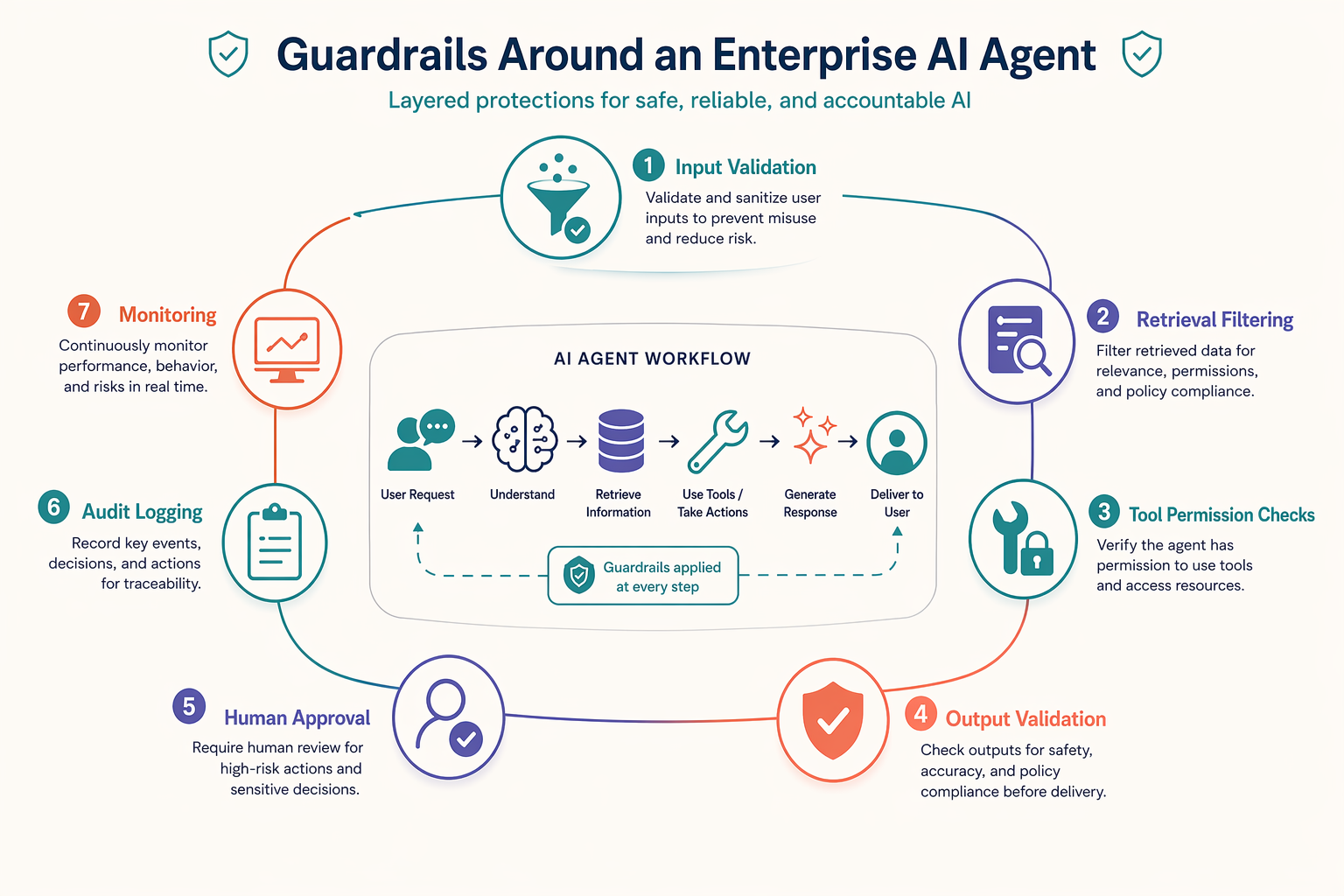
In practice, guardrails usually include:
- Input controls: prompt injection detection, PII handling, tenant isolation
- Retrieval controls: source whitelists, document permissions, citation requirements
- Tool controls: role-based access, action allowlists, side-effect restrictions
- Output controls: structured validation, policy checks, toxicity or compliance filters
- Runtime controls: maximum tool calls, budget limits, timeout thresholds
- Governance controls: logs, approvals, traceability
The takeaway is that safe agents are built with multiple containment layers, not a single “be safe” instruction in the system prompt.
A Practical Implementation Example: Customer Support Resolution Assistant
Consider a SaaS company that handles high-volume support tickets. The business goal is not to replace agents, but to reduce time spent gathering context and drafting replies.
Product workflow
When a new ticket arrives, the assistant should:
- classify the issue
- fetch customer account details
- retrieve relevant help center articles and prior internal resolutions
- decide whether the issue can be resolved automatically
- draft a response
- request human approval for medium- or high-risk cases
- create or update the support ticket record
This is a classic constrained agent workflow: the task is multi-step, tool-based, and benefits from human oversight.
Reference implementation in Python
The code below demonstrates a lightweight orchestrator using standard Python. It does not depend on any agent framework, which is often a good starting point for production teams that want control and observability.
from dataclasses import dataclass, field
from typing import Dict, List, Any, Optional
import time


@dataclass
class TicketContext:
    ticket_id: str
    customer_id: str
    message: str
    classification: Optional[str] = None
    account: Dict[str, Any] = field(default_factory=dict)
    kb_results: List[Dict[str, str]] = field(default_factory=list)
    draft_reply: Optional[str] = None
    needs_human_review: bool = False
    action_log: List[str] = field(default_factory=list)


def classify_issue(message: str) -> str:
    msg = message.lower()
    if "refund" in msg or "charge" in msg:
        return "billing"
    if "error" in msg or "crash" in msg or "login" in msg:
        return "technical"
    return "general"


def get_customer_account(customer_id: str) -> Dict[str, Any]:
    return {
        "customer_id": customer_id,
        "plan": "Enterprise",
        "region": "EU",
        "open_tickets": 2,
        "renewal_risk": "medium"
    }


def search_kb(query: str) -> List[Dict[str, str]]:
    return [
        {
            "title": "Troubleshooting login failures",
            "summary": "Check SSO configuration, recent password reset, and identity provider logs."
        },
        {
            "title": "Common causes of application crashes",
            "summary": "Review client version, browser console errors, and recent deployment notes."
        }
    ]


def draft_support_reply(context: TicketContext) -> str:
    article_titles = ", ".join(item["title"] for item in context.kb_results[:2])
    return (
        f"Hello,\n\n"
        f"We reviewed your request and identified it as a {context.classification} issue. "
        f"Based on our knowledge base, the most relevant guidance includes: {article_titles}. "
        f"Our team recommends starting with the steps outlined there. "
        f"If the issue continues, we will escalate with the details already collected.\n\n"
        f"Best,\nSupport Team"
    )


def should_require_human_review(context: TicketContext) -> bool:
    if context.classification == "billing":
        return True
    if context.account.get("renewal_risk") == "medium":
        return True
    return False


def update_ticket_system(ticket_id: str, payload: Dict[str, Any]) -> None:
    print(f"[ticket_update] ticket={ticket_id} payload={payload}")


def run_support_agent(ticket_id: str, customer_id: str, message: str) -> TicketContext:
    ctx = TicketContext(ticket_id=ticket_id, customer_id=customer_id, message=message)

    start = time.time()
    ctx.classification = classify_issue(ctx.message)
    ctx.action_log.append(f"classified:{ctx.classification}")

    ctx.account = get_customer_account(ctx.customer_id)
    ctx.action_log.append("fetched_account")

    ctx.kb_results = search_kb(f"{ctx.classification} {ctx.message}")
    ctx.action_log.append("searched_kb")

    ctx.draft_reply = draft_support_reply(ctx)
    ctx.action_log.append("drafted_reply")

    ctx.needs_human_review = should_require_human_review(ctx)
    ctx.action_log.append(f"human_review:{ctx.needs_human_review}")

    update_ticket_system(
        ctx.ticket_id,
        {
            "classification": ctx.classification,
            "draft_reply": ctx.draft_reply,
            "needs_human_review": ctx.needs_human_review,
            "latency_ms": int((time.time() - start) * 1000)
        }
    )

    return ctx


if __name__ == "__main__":
    result = run_support_agent(
        ticket_id="TCK-10025",
        customer_id="CUST-88",
        message="Our users cannot log in after enabling SSO and we are seeing repeated errors."
    )
    print(result)
This example intentionally keeps planning deterministic. The workflow is still agentic because it manages a task across multiple steps, tools, state, and decision points. In production, an LLM can be introduced in controlled places such as classification, retrieval query rewriting, resolution drafting, and escalation reasoning.
The important lines are the ones that define explicit state (TicketContext), separate tool functions, and preserve an action log. Those three decisions make the system easier to debug, test, and govern.
Evaluation: What to Measure Beyond “Looks Good”
Agentic systems cannot be evaluated only by reading a few outputs. You need to assess the whole trajectory.
Good evaluation dimensions include:
- Task success: was the business goal completed correctly?
- Tool accuracy: were the right tools called with valid arguments?
- Grounding quality: was evidence used correctly?
- Policy compliance: were restricted actions blocked?
- Human escalation quality: were approvals requested when appropriate?
- Latency and cost: how many model calls and tool calls were required?
- Recovery behavior: did the system handle tool failures safely?
A practical evaluation suite usually combines:
- offline test cases with expected trajectories
- simulated user interactions
- production trace review
- A/B comparisons against baseline workflows
- business metrics such as resolution time, handle time, or escalation rate
For many teams, the right comparison is not “agent versus no agent.” It is “agent-assisted workflow versus current manual process.”
Common Mistakes and Production Risks
The biggest implementation mistakes are usually architectural, not model-related.
Common mistakes
- using an unconstrained general-purpose agent for a narrow workflow
- giving the model too many poorly defined tools
- storing raw conversations instead of structured state
- skipping approval gates for high-impact actions
- relying on prompt instructions instead of hard permission checks
- evaluating final answers but not intermediate actions
- ignoring latency and cost from repeated loops
Real production risks
- Prompt injection through retrieved content
- Unauthorized tool use or cross-tenant data exposure
- Silent task failure after partial completion
- Runaway loops that increase cost
- Incorrect memory persistence
- Unclear accountability when a model triggers an action
The practical takeaway is that production agentic AI requires the same rigor as any distributed system, plus an extra layer of probabilistic behavior management.
When to Use an Agent and When Not To
Use an agent when the workflow requires adaptation across multiple steps and systems. Do not use one when a fixed pipeline, search system, or standard RAG flow already solves the job reliably.
A good decision checklist is:
- Does the task involve multiple tools or systems?
- Does the sequence vary case by case?
- Is there clear value in planning or iterative action?
- Can the workflow be bounded with policies and approvals?
- Do you have observability and evaluation capacity?
If the answer to most of these is no, a simpler architecture is probably better.
Conclusion
Agentic AI is best understood as a workflow pattern, not a buzzword. It extends LLM applications from single-response generation into goal-directed task execution using planning, tools, memory, guardrails, and human review. For real-world builders, the challenge is not merely making the model capable. It is designing a system that is reliable, constrained, observable, and aligned with business risk.
The most successful implementations are rarely fully autonomous. They are focused, tool-driven, policy-aware systems that automate repetitive work while keeping humans in control where it matters. Start with a bounded use case, explicit state, narrow tools, strong logging, and a realistic evaluation plan. That is the path from demo agent to production system.
References and Further Reading
- OpenAI documentation on function calling and tool use
- Anthropic documentation on tool use and constitutional safety
- LangChain and LangGraph documentation
- LlamaIndex documentation
- “ReAct
Related Topics
Related Resources
AI Safety Failures in LLM, RAG, and Agent Systems: Long-Horizon Risks, Root Causes, and Practical Mitigations
Research-grade guide to AI safety failures in LLM, RAG, and agents: causes, evaluations, long-horizon risks, mitigations, and practice.
articleBuilding LLM memory from scratch
In LLM ,memory is one of the important ascepts of preventing halluciation and prevent contextual leaks with the LLM. This is tackled using memory attention
articleRAG Systems
The blog helps you in implementing and using RAG which is most popular LLM application