
Attention in AI Agents: How Context Drives Memory, Retrieval, and Better Decisions
What Attention Means Inside an AI Agent
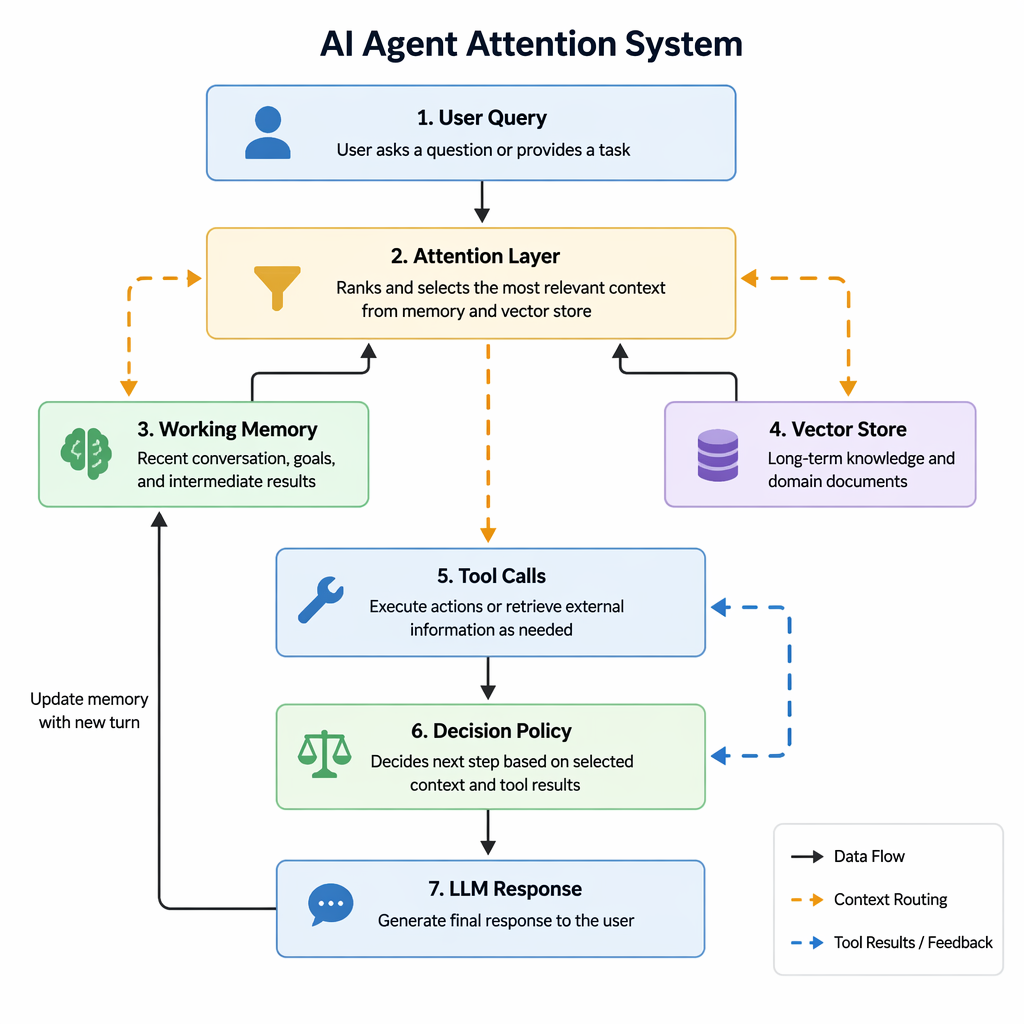
Inside an AI agent, attention is the routing system for relevance. At a model level, it’s the mechanism that lets the LLM weigh which tokens matter most when generating the next token. But in an actual agent stack, attention is broader than transformer math. It shows up in every decision about what context stays in play: recent conversation turns, long-term memory, retrieved documents, system instructions, tool outputs, and intermediate reasoning state.
In practice, an agent is constantly asking a quiet operational question: “What should I look at right now?” If it keeps too much context active, prompts get bloated, latency rises, and token costs climb. If it keeps too little, it misses important constraints, forgets user preferences, or uses stale information.
A practical agent pipeline might look like this:
active_context = [
    system_rules,
    recent_messages[-6:],
    retrieve_relevant_docs(query, k=4),
    load_user_memory(user_id, top_n=3),
    latest_tool_results
]
That looks simple, but the tradeoffs are real:
- Quality: Better attention selection improves grounding and reduces hallucinations.
- Latency: More context means more tokens to process, which slows every step.
- Cost: Irrelevant retrieved chunks and oversized histories directly increase spend.
- Reliability: Poor attention management can surface conflicting instructions or outdated memory.
This is why production agents rarely dump everything into the prompt. They usually apply ranking, filtering, summarization, and truncation before each model call. For example, a support agent may prioritize:
- the current customer issue,
- account-specific facts,
- the latest policy document,
- and the result of a refund eligibility tool.
It should probably ignore unrelated past tickets, low-confidence retrieval hits, or old tool outputs that no longer reflect the current state.
So when people say an agent is “smart,” a lot of that intelligence comes from attention discipline. The agent performs well not just because the model is capable, but because the system consistently puts the right context in front of it at the right time.
Architecture: Attention Across Short-Term Memory, RAG, and Tool Use
In a production agent, attention is not just a model feature—it becomes an architecture pattern for deciding what the model should see right now. The core design challenge is simple: the agent has more possible context than fits in the prompt window, so something upstream must rank, compress, and assemble the most relevant inputs before inference.
A practical stack usually has four context layers:
- Prompt-window context: current user request, system rules, active task state
- Short-term/session memory: recent turns, unresolved actions, temporary preferences
- Retrieved knowledge (RAG): documents, tickets, logs, product specs, policies
- External tools: APIs, databases, calculators, workflow systems
In production, an orchestrator sits in front of the model and builds a final context bundle. It typically:
-
Classifies the request
Is this conversational, transactional, analytical, or tool-heavy? -
Ranks available context sources
Recent conversation may matter more for a follow-up question; policy docs may matter more for a compliance decision. -
Trims noisy history
Instead of replaying the full session, it keeps:- recent turns
- open entities/tasks
- a rolling summary of older discussion
-
Runs retrieval
Pull top-k chunks from search or vector indexes, then deduplicate and rerank against the live query and session state. -
Decides on tool use
If the answer depends on live state—inventory, account status, metrics—the orchestrator calls tools and injects results as structured context.
A common implementation looks like this:
context_bundle = {
    "system": system_instructions,
    "user_query": query,
    "session_summary": summarize(history),
    "recent_turns": last_n_turns(history, 6),
    "retrieved_docs": rerank(search(query), query)[:5],
    "tool_results": run_tools_if_needed(query, state),
}
response = model.generate(context_bundle)
The key tradeoff is recall vs. token budget. Too much context increases cost and distracts the model; too little causes brittle decisions. Strong systems solve this with context scoring, summarization, and structured tool outputs rather than dumping everything into the prompt. The result is an agent that behaves less like a chatbot with a long transcript and more like a decision system that focuses attention where it creates the most business value.
Practical Engineering Workflow with Python: Building Context-Aware Agent Loops
In production agent systems, “attention” is usually not a single model feature—it’s an orchestration layer that decides what context deserves scarce tokens before every LLM call. A practical Python workflow often looks like this:
-
Collect candidate context
- recent conversation turns
- long-term memory hits from a vector store
- tool outputs
- task state, user profile, and constraints
-
Score and filter
- similarity: semantic relevance to the current query
- recency: newer events often matter more
- importance: user preferences, unresolved tasks, failures
- trustworthiness: prioritize verified tool outputs over stale generated text
-
Assemble a token-bounded prompt
- keep critical instructions fixed
- insert top-ranked context
- summarize overflow instead of truncating blindly
A simple scoring approach can be surprisingly effective:
from dataclasses import dataclass
from time import time

@dataclass
class ContextItem:
    text: str
    sim: float
    timestamp: float
    importance: float
    source: str

def recency_score(ts, half_life_hours=24):
    age_hours = max((time() - ts) / 3600, 0)
    return 0.5 ** (age_hours / half_life_hours)

def rank(items):
    scored = []
    for item in items:
        score = (
            0.5 * item.sim +
            0.2 * recency_score(item.timestamp) +
            0.2 * item.importance +
            0.1 * (1.0 if item.source == "tool" else 0.7)
        )
        scored.append((score, item))
    return [i for _, i in sorted(scored, reverse=True, key=lambda x: x[0])]
Before the model call, teams often apply a decision policy:
- Retrieve if the query references prior work, documents, or customer-specific facts.
- Summarize if conversation history exceeds a token threshold.
- Call a tool if the answer depends on live or verifiable data.
- Skip retrieval for simple reasoning tasks where extra context may add noise and latency.
Prompt assembly should be explicit and budgeted:
def build_prompt(system_msg, query, ranked_context, max_chars=12000):
    parts = [system_msg, f"\nUser: {query}\n", "\nRelevant context:\n"]
    used = sum(len(p) for p in parts)

    for item in ranked_context:
        chunk = f"- [{item.source}] {item.text}\n"
        if used + len(chunk) > max_chars:
            break
        parts.append(chunk)
        used += len(chunk)

    return "".join(parts)
In real deployments, this loop improves more than answer quality. It reduces token cost, avoids overwhelming the model with irrelevant history, and makes agent behavior easier to debug. When a bad decision happens, engineers can inspect the ranked context list, summarizer output, and tool-filtering rules instead of treating the model as a black box.
Real-World Use Cases: Support Copilots, Sales Agents, and Operations Assistants
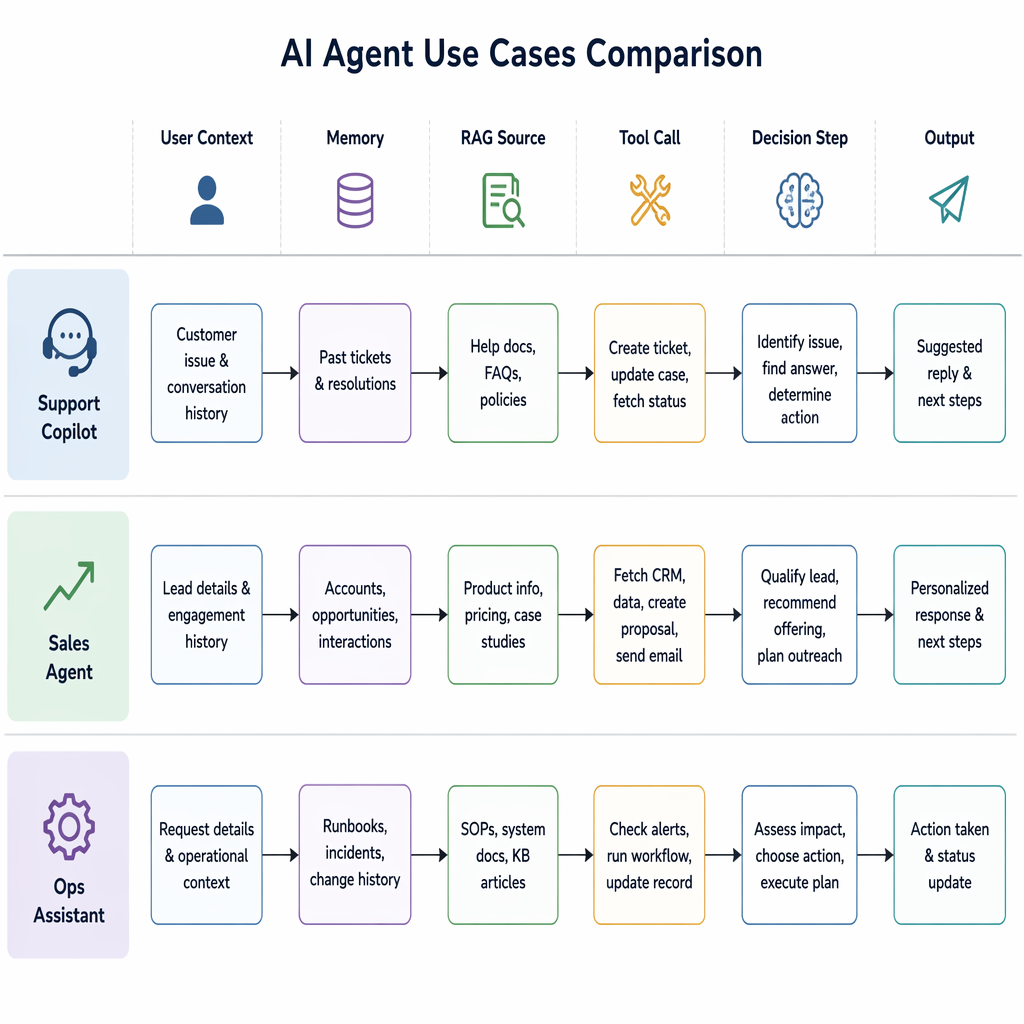
In production agent systems, attention is less about mimicking human cognition and more about deciding what deserves scarce context window space. The best business copilots do not dump every record into a prompt. They rank, compress, and route the right context for the job.
For a support copilot, the highest-value signals are usually recent tickets, account tier, product usage anomalies, refund history, and unresolved escalations. A practical architecture combines:
- Short-term session memory: current chat, latest customer actions
- Structured retrieval: CRM fields, order status, entitlements
- Semantic retrieval: prior ticket summaries, knowledge base articles
- Guardrails: PII redaction, role-based access, citation requirements
A common pattern is to keep raw ticket transcripts out of the prompt unless needed, and instead retrieve summaries plus links. This improves latency and reduces privacy risk. The tradeoff: summarization errors can hide nuance, so many teams retain a fallback “drill-down” retrieval step for complex cases.
For a sales agent, attention should prioritize CRM notes, recent emails, open opportunities, pricing constraints, and stakeholder maps. Here, memory boundaries matter: you want the agent to remember deal context across meetings, but not invent durable facts from casual chat. That usually means writing only approved structured updates back to memory.
context = rank([
    crm.account_summary,
    recent_emails,
    meeting_notes,
    pricing_policy,
    product_fit_docs
], query=intent, recency_weight=0.4, authority_weight=0.6)
For operations assistants handling incidents, attention focuses on current alerts, service ownership, recent deploys, runbooks, and similar past incidents. Speed often beats breadth. Teams commonly use a two-stage retrieval pipeline:
- Pull high-confidence structured context from observability and incident systems
- Add semantic matches from postmortems and runbooks
The deployment tradeoff is clear: more retrieval improves coverage, but increases latency and failure modes. Reliable systems cap context size, prefer authoritative sources first, and expose provenance so humans can verify recommendations before acting.
Common Mistakes: Context Overflow, Bad Retrieval, and Attention Misalignment
One of the fastest ways to make an AI agent worse is to give it more context than it can actually use well. Teams often start by dumping entire chat histories, verbose tool logs, and every retrieved document chunk into the prompt “just to be safe.” In production, that usually backfires.
Common failure modes include:
- Context overflow: critical instructions get buried under irrelevant history
- Bad retrieval: semantically similar but operationally wrong chunks get injected
- Noisy memory: agents store transient observations as long-term facts
- Attention misalignment: large tool outputs crowd out user intent and system rules
The result is familiar: hallucinations, missed constraints, stale decisions, slower responses, and higher token bills.
A classic anti-pattern looks like this:
prompt_context = {
    "system": system_prompt,
    "chat_history": full_conversation,     # too much
    "retrieved_docs": top_20_chunks,       # low precision
    "tool_outputs": raw_api_payloads,      # too verbose
    "memory": all_saved_facts              # noisy and stale
}
This fails because not all context deserves equal weight. In practice, agents need context budgeting. Treat tokens like scarce infrastructure.
Better design patterns:
- Summarize history, don’t replay it
- Keep the last few turns verbatim
- Maintain a rolling summary for older conversation state
- Gate retrieval
- Retrieve broadly, then rerank narrowly
- Filter by source quality, freshness, and task relevance
- Write memory selectively
- Store stable preferences, decisions, and durable facts
- Expire or downrank temporary observations
- Compress tool output
- Extract salient fields instead of pasting raw JSON
- Separate evidence from interpretation
For example:
if memory_item.confidence > 0.8 and memory_item.is_durable:
    memory_store.upsert(memory_item)
A useful architecture rule is: instructions first, task state second, evidence third, raw exhaust last—or never. Many teams also add citation checks before allowing retrieved content to influence final answers.
The business impact is significant. Better context discipline reduces inference cost, improves answer consistency, and makes agent behavior easier to debug. When an agent fails, you want a small, structured context window you can inspect—not a token landfill.
Deployment Tradeoffs and Design Checklist for Production Agents
In production agents, attention architecture is a product decision as much as a model decision. The right choice depends on what your agent must remember, how fast it must respond, and what risks the business can tolerate.
A useful rule of thumb:
- Use larger context windows when conversations are short-to-medium length, latency is acceptable, and simplicity matters more than token efficiency.
- Use retrieval-first designs when knowledge is large, changes often, or must be scoped tightly by tenant, user, or document permissions.
- Use summarization layers when sessions are long-running and you need continuity without replaying every turn.
- Use explicit memory stores when the agent must persist durable user preferences, workflow state, or business facts across sessions.
In practice, many production systems evolve into a hybrid:
def build_context(user_id, session_id, query):
    recent = get_recent_messages(session_id, limit=12)
    summary = get_session_summary(session_id)
    retrieved_docs = search_knowledge_base(query, user_id=user_id, top_k=5)
    profile = get_user_memory(user_id, keys=["preferences", "account_state"])
    return assemble_prompt(recent, summary, retrieved_docs, profile, query)
Design checklist for production agents:
- Observability
- Log retrieval hits, prompt size, memory reads/writes, tool calls, latency by stage
- Store failure samples for prompt/debug review
- Memory expiration
- Define TTLs for short-term memory
- Separate ephemeral session state from persistent user memory
- Add deletion and correction workflows
- Evaluation metrics
- Track answer quality, retrieval precision, memory usefulness, hallucination rate, task completion, and cost per successful task
- Latency budgets
- Set per-step budgets for retrieval, summarization, model inference, and tool execution
- Prefer async/background summarization where possible
- Privacy and controls
- Mask sensitive fields, enforce tenant isolation, support opt-out and data deletion
- Never persist raw memory by default without policy review
- Upgrade signals
- Move beyond “just a big context window” when token cost spikes, conversations truncate critical history, or retrieval accuracy becomes the bottleneck
- Add explicit memory when users expect continuity across days or workflows require durable state
The key tradeoff is simple: more context feels easy, but structured memory scales better. Start with the simplest architecture that meets quality goals, then add retrieval, summarization, and persistent memory only when traffic, complexity, or compliance requirements force the next step.
Related Topics
Related Resources
Frontier Models, Broken Boundaries, and Why Sandboxing Is Core AI Infrastructure
Learn what frontier models are, how AI crossed cyber boundaries, and how sandboxing, RAG controls, and containment reduce real deployment risk.
articleAI Safety Failures in LLM, RAG, and Agent Systems: Long-Horizon Risks, Root Causes, and Practical Mitigations
Research-grade guide to AI safety failures in LLM, RAG, and agents: causes, evaluations, long-horizon risks, mitigations, and practice.
articleGuardrails with langchain middleware in a finance
This blog explains how to use LangChain middleware as a guardrail layer for financial document extraction RAG systems. It covers why guardrails matter, how middleware controls retrieval and model behavior, practical validation patterns, audit-ready workflows, common failure modes, testing strategies, and when human review is required.