How a Production LLM System Like Kimi-k3 Probably Serves Billions of Requests
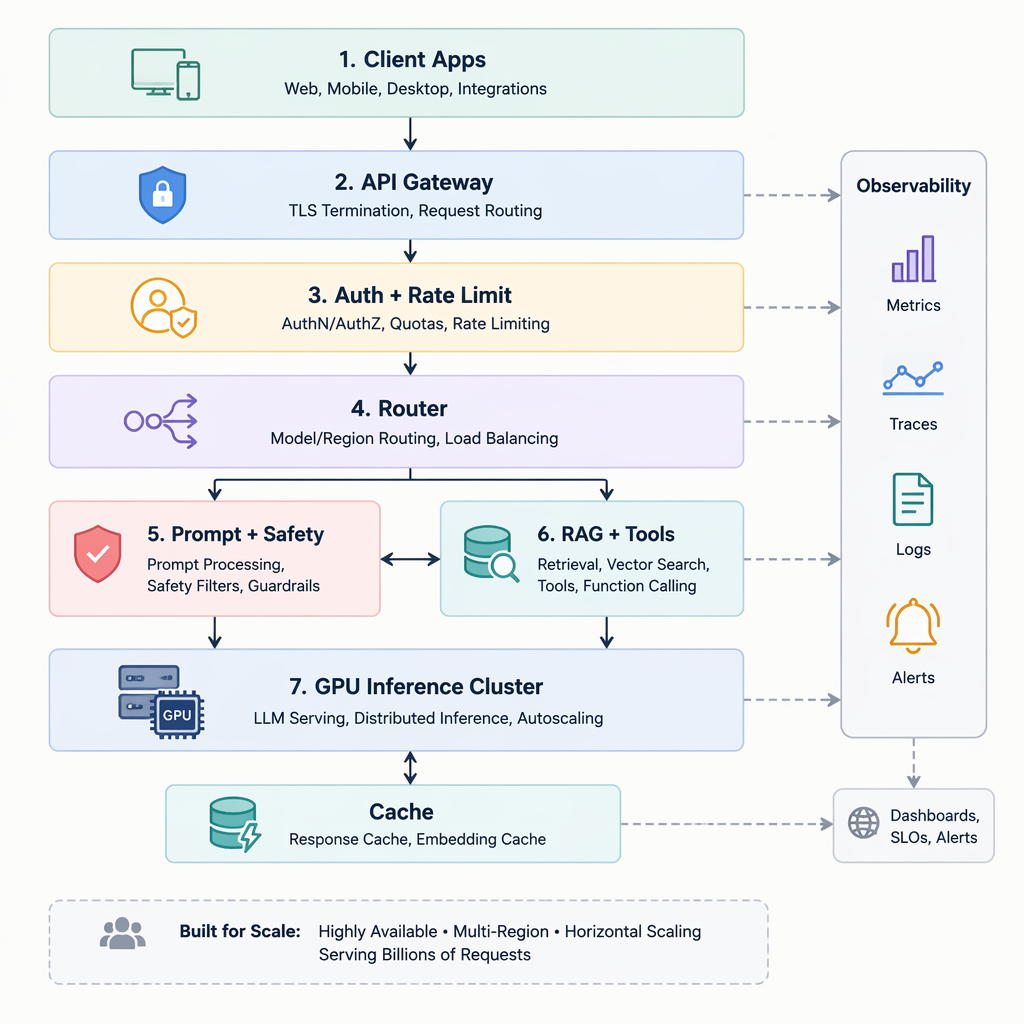
What a Real-World LLM Production Stack Looks Like
A system like Kimi-k3 is not just “a big model behind an API.” At production scale, it’s a business system balancing four forces at once:
- Product requirements: chat, search, coding help, agents, multimodal features
- Latency: users expect useful first tokens in seconds, not minutes
- Reliability: retries, failover, overload protection, and graceful degradation
- Cost: GPU time is expensive, so every token and every routing decision matters
In practice, that leads to a layered serving architecture rather than one monolithic model service.
At the edge, traffic enters through client-facing gateways: web apps, mobile apps, enterprise APIs, and internal tools. These requests usually hit an API gateway/load balancer that handles authentication, rate limiting, tenant isolation, request shaping, and regional routing. From there, a request router decides what should actually happen: which model to call, whether to use cached context, whether a lightweight model is enough, or whether the task needs a larger reasoning model.
A simplified flow often looks like this:
Client -> API Gateway -> Request Router -> Safety/Policy Layer
       -> Prompt Builder / Context Retrieval -> Inference Cluster
       -> Post-processing / Filtering -> Response Stream
Behind that router sits the expensive core: inference clusters. These are GPU fleets optimized for token generation, batching, KV-cache reuse, autoscaling, and sometimes model specialization. Many companies split traffic across:
- Fast/cheap models for simple queries
- Large models for hard prompts
- Specialized models for code, search, or vision tasks
Around inference, you almost always see safety middleware and policy enforcement. This includes prompt inspection, jailbreak detection, abuse monitoring, output filtering, and enterprise compliance controls. These layers are critical because the production problem is not only “generate text,” but “generate text safely and predictably under load.”
Finally, the stack depends on state and observability: conversation storage, feature flags, prompt/version management, caching, metrics, tracing, token-level latency dashboards, and alerting. At billion-request scale, the real moat is often not the model alone, but the operational system wrapped around it.
How Kimi Probably Handles Billions of Requests: Routing, Batching, and GPU Efficiency
At billion-request scale, the serving problem is usually not “run one giant model faster”. It’s shape traffic, route intelligently, and keep GPUs saturated without blowing up latency. A system like Kimi likely treats inference as a multi-stage traffic engineering problem.
A practical flow probably looks like this:
- Admission control rejects or downgrades work when the system is hot
- Routing sends easy tasks to smaller/cheaper models and harder tasks to premium paths
- Dynamic batching groups requests arriving within a tiny time window
- KV-cache reuse avoids recomputing shared prompt prefixes
- Queueing and autoscaling smooth bursty traffic
- Fallbacks preserve availability when a model pool is overloaded
In production, the key tradeoff is simple: throughput wants bigger batches, but latency wants immediate execution. So teams typically use micro-batching windows—for example 5–20 ms—to collect enough requests for efficient tensor execution without making users wait too long. Interactive chat may get smaller batches; background workloads like summarization can tolerate larger queues.
Routing is where product economics show up. Not every request deserves the biggest model. A likely policy is:
- safety/moderation first
- classify task type
- route to a small model for lightweight rewrite/search/help tasks
- escalate to a larger reasoning model only when confidence is low or premium quality is needed
A simplified Python sketch:
async def route_request(req):
    if overloaded() and not req.is_premium:
        return route_to_fallback_model(req)

    task = classify_task(req)
    if task in {"rewrite", "tagging", "simple_qa"}:
        return await small_model_pool.generate(req)
    if low_confidence(req) or req.requires_reasoning:
        return await large_model_pool.generate(req)
    return await medium_model_pool.generate(req)
KV-cache reuse matters enormously in chat systems. If millions of users share a system prompt, policy prefix, or retrieved context template, the service can reuse previously computed attention states for that prefix, cutting both cost and time-to-first-token.
Finally, extreme-scale systems need graceful degradation, not perfection. When demand spikes, they may:
- reduce max output length
- switch to smaller models
- disable expensive reasoning modes
- queue non-urgent jobs
- return cached or partial results
That’s usually how you survive massive traffic: protect latency for important requests, preserve GPU utilization, and spend model quality where it actually changes user value.
RAG, Memory, and Agent Workflows in Production AI Systems
A production system serving real user questions almost never relies on raw base-model inference alone. In practice, something like Kimi-k3 likely sits inside a larger runtime that combines retrieval-augmented generation (RAG), short-term memory, and tool-driven agent workflows. The model is the reasoning engine, but the surrounding system supplies fresh facts, user context, and external actions.
A common architecture looks like this:
User Query
  -> Query classifier/router
  -> Retrieval + memory lookup + tool planning
  -> LLM reasoning
  -> Optional tool calls / follow-up retrieval
  -> Reranked context
  -> Final answer + citations / actions
The document pipeline is usually its own production subsystem. Content from PDFs, web pages, internal docs, tickets, code repos, or chat logs is:
- parsed and cleaned
- chunked into retrieval-friendly passages
- embedded into vectors
- indexed in a vector store, often alongside keyword indexes
- enriched with metadata like source, timestamp, ACLs, and freshness signals
At query time, systems often use hybrid retrieval: vector search for semantic similarity plus BM25/keyword search for exact terms. Then a reranker trims maybe 100 candidate chunks down to the top 5–20 that actually go into the prompt. This matters because context windows are expensive, and poor retrieval quality quickly turns into hallucinations.
Memory is also usually layered. A chat assistant may keep:
- session memory: recent turns in the active conversation
- episodic memory: durable user preferences or prior tasks
- working memory: temporary scratchpad state for a multi-step workflow
For example, a support assistant may remember “this user prefers concise answers” while also pulling account-specific documents at request time. That is very different from an enterprise search product, where durable memory matters less than permissions-aware retrieval and source attribution.
Tool use changes the architecture again. Instead of only answering from text, the model may call:
- search APIs
- databases
- calculators
- code execution sandboxes
- ticketing or CRM systems
- web browsers
- repository tools
A lightweight orchestrator typically decides whether the model should answer directly, retrieve more context, or invoke a tool. In many real systems, this is not a fully autonomous agent loop. It is a constrained state machine with budgets, retries, and guardrails. That keeps latency and cost predictable.
For coding agents, retrieval often targets:
- repository embeddings
- symbol graphs
- documentation
- recent diffs
- build/test outputs
The workflow is more action-oriented: read code, propose a patch, run tests, inspect failures, retry. Here, the “memory” is often the task state plus execution results, not just prior chat turns.
For research workflows, systems may do multi-hop retrieval across papers, web sources, and notes, then synthesize findings with provenance. These flows benefit from reranking and citation tracking more than long conversational memory.
The key production insight is that “agentic AI” is usually a composition of specialized infrastructure around the model: retrieval for facts, memory for continuity, tools for actions, and orchestration for control. That is what turns a strong base model into a product that can answer real queries reliably at scale.
Deployment Patterns, Reliability Controls, and Python Integration Points
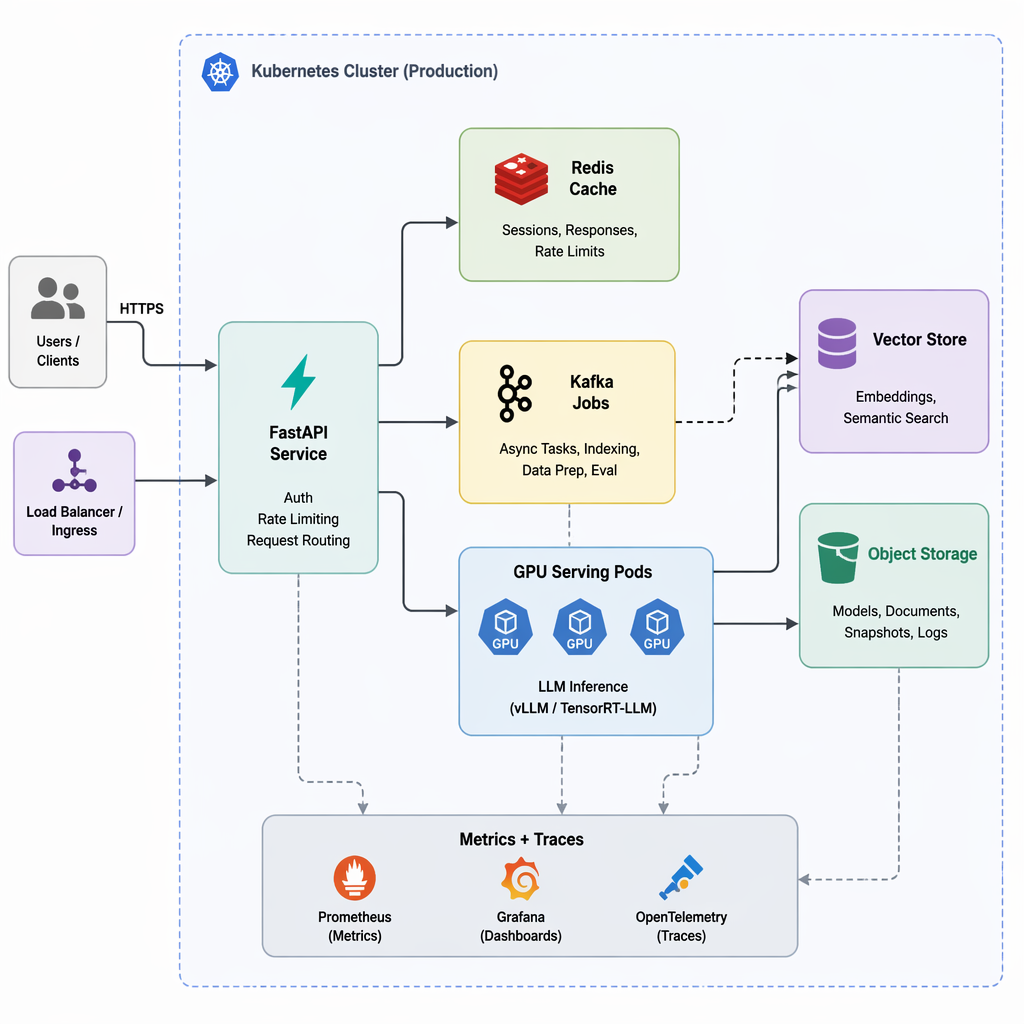
In production, systems like Kimi-k3 are rarely deployed as a single “model service.” They are usually a layered platform: a public API gateway, request orchestration tier, model-serving backends, retrieval/indexing services, GPU schedulers, and an observability stack that ties it all together.
A common pattern is:
- API edge layer: FastAPI or Envoy-based services handling auth, rate limits, tenant isolation, and request shaping
- Orchestration layer: async Python services deciding whether to run pure generation, RAG, tools, or cached responses
- Model-serving layer: vLLM, Triton, or custom inference servers pinned to GPU pools
- Data services: feature stores, vector databases, prompt/version registries, and document ingestion workers
- Reliability layer: queues, circuit breakers, retries, fallback models, and admission control
- Observability: structured logs, token/latency metrics, traces, prompt-response sampling, and offline eval pipelines
In Python, FastAPI is a practical integration point because it supports streaming and async I/O cleanly:
from fastapi import FastAPI
from fastapi.responses import StreamingResponse

app = FastAPI()

async def token_stream():
    for chunk in ["Hello", " ", "world"]:
        yield chunk

@app.post("/chat")
async def chat():
    return StreamingResponse(token_stream(), media_type="text/plain")
Behind that endpoint, teams usually add retry logic with budgets, not blind retries. If the primary inference cluster is overloaded, the orchestrator may downgrade to a smaller model or shorter context window rather than failing the request entirely. Python async tasks are also useful for background document ingestion: parse files, chunk text, compute embeddings, and update indexes without blocking user traffic.
Just as important are evaluation and recovery workflows. Nightly Python jobs often replay sampled production prompts against candidate models, compare quality and cost, and flag regressions before rollout. This deployment style reflects a business reality: at billion-request scale, reliability is less about one big model and more about operational control across many cooperating services.
Common Mistakes Teams Make When Scaling LLM and Agent Systems
A common pattern in early LLM products is “the demo model becomes the production architecture.” Teams wire every request to a single large model because it works well in a prototype, then get surprised when traffic grows and margins disappear. In production, this usually creates two problems at once:
- Inference cost explodes
- Latency becomes unpredictable under load
A better pattern is a tiered model strategy: route simple classification, rewriting, or extraction tasks to smaller models, and reserve the frontier model for hard reasoning or final synthesis.
def route_request(task):
    if task.type in {"classification", "entity_extraction", "rerank"}:
        return "small_fast_model"
    elif task.requires_deep_reasoning:
        return "large_reasoning_model"
    return "mid_tier_model"
Another expensive mistake is ignoring caching. In real systems, many prompts are repeated: popular queries, repeated retrieval contexts, template-heavy workflows, and agent tool results. Without caching, teams pay full price for work they have already done. The business impact is immediate: higher GPU spend, lower throughput, and more rate-limit incidents during demand spikes.
Teams also underestimate prompt versioning. When prompts live in code comments, ad hoc notebooks, or copied dashboard text, nobody can answer basic operational questions: What changed? Which variant caused the regression? Which customers were affected? Weak versioning turns every prompt edit into an untracked production experiment, which directly harms user trust and slows incident response.
Security issues often come from unsafe tool permissions. Agents that can freely send emails, query internal systems, or execute broad actions without scoped access controls become an operational and compliance risk. The failure mode is not theoretical—one bad prompt injection or tool misuse can trigger data exposure, destructive actions, or audit findings. Good production systems constrain tools with least-privilege access, approval gates, and policy checks.
Just as dangerous is poor observability. If you cannot trace model choice, retrieval results, tool calls, token usage, and final outcomes per request, debugging becomes guesswork. Operations teams end up fighting incidents with incomplete evidence, increasing MTTR and making launches feel risky.
Finally, many teams forget the slower-moving failure modes:
- Stale indexes lead to wrong or outdated answers
- No offline evaluation loop means regressions reach production first
Without regular re-indexing, freshness checks, and benchmark suites tied to real tasks, quality drifts silently until customers notice. By then, the damage is already visible in support tickets, churn, and emergency rollback culture.
A Practical Blueprint: Choosing the Right Architecture for Your AI Product
Most teams do not need a frontier-grade serving stack on day one. The right architecture is usually the simplest system that meets your product’s latency, quality, and reliability goals—and only gets more complex when the business case is clear.
A practical decision framework looks like this:
- Start with plain chat serving when:
- Your product is mostly conversational UX
- Answers come from general model knowledge
- Latency matters more than perfect factual grounding
- Traffic is still predictable and modest
This is often enough for copilots, brainstorming tools, and internal assistants. Keep the stack lean: API gateway, model endpoint, caching, moderation, logging.
- Add RAG when:
- Users expect answers from your documents, tickets, policies, or product data
- Hallucinations create support, legal, or trust problems
- Content changes frequently enough that fine-tuning is too slow
Typical flow:
User query -> retrieval -> rerank -> prompt assembly -> model -> citation/trace output
RAG is usually the highest-ROI upgrade because it improves factuality without requiring a full agent system.
- Introduce agents only when the model must take actions, not just answer:
- File a ticket
- Query multiple systems
- Run workflows with branching logic
- Call tools and verify outputs
Agents add power, but also failure modes: tool errors, retries, state handling, permission boundaries, and unpredictable latency. If a workflow is deterministic, prefer orchestrated pipelines over open-ended agents.
- Adopt advanced routing and multi-model serving when:
- Traffic reaches large scale with meaningful cost pressure
- You serve different request classes: cheap, fast, premium, long-context, compliance-bound
- You need fallback models for uptime or regional deployment constraints
A useful production heuristic:
- Simple chat for early-stage products
- RAG for knowledge-heavy products
- Agents for action-heavy products
- Routing + multi-model for scale, cost control, and reliability
The blueprint is simple: earn complexity. Add each layer only when it solves a measurable product problem—better accuracy, lower cost, tighter compliance, or higher uptime.
Related Topics
Related Resources
Semantic Search and Retrieval-Augmented Generation (RAG)
Unlock the power of Semantic Search and Retrieval-Augmented Generation (RAG) using Generative AI. Learn how modern AI systems extract information, improve accuracy, and deliver truly contextual responses.
videoAI Agents: The Rise of "Smart Digital Workers" (Full Guide)
Are AI Agents just hype, or are they the future of work? Discover the shift from traditional software to AI Agents—"Smart Digital Workers" that use LLMs as a reasoning backbone to think, decide, and act autonomously.
articleAI Safety Failures in LLM, RAG, and Agent Systems: Long-Horizon Risks, Root Causes, and Practical Mitigations
Research-grade guide to AI safety failures in LLM, RAG, and agents: causes, evaluations, long-horizon risks, mitigations, and practice.