
What Is an AI Agent and Why Build One with Python and Gemini?
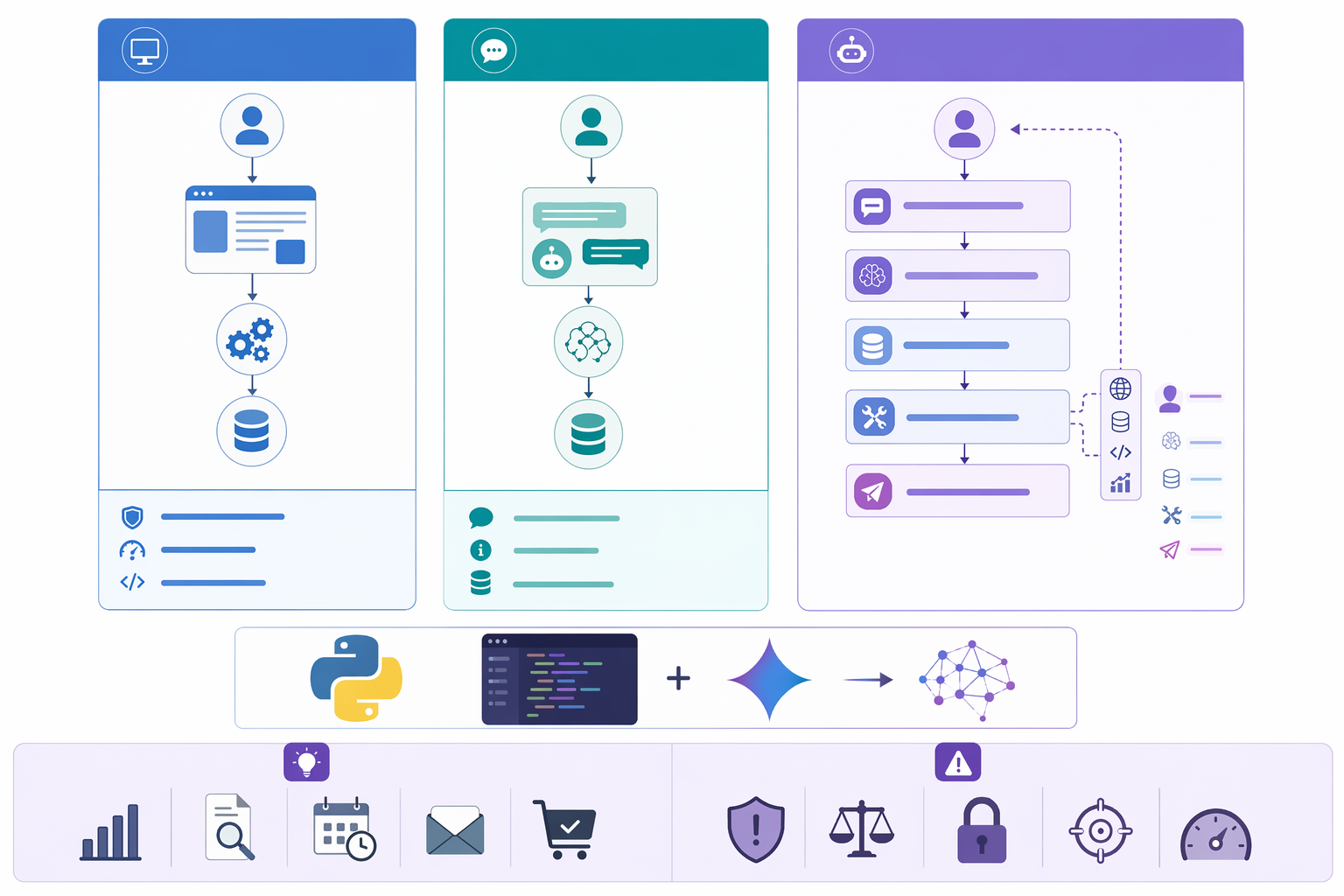
An AI agent is more than a model that answers questions. It is a system designed to understand a goal, reason through the steps, and take action using tools such as APIs, databases, search functions, or external apps. In practical terms, an AI agent can receive an instruction like, “Find the latest competitor pricing and summarize the changes,” then break that task into smaller steps, gather information, and return a useful result.
This is what separates an AI agent from a standard chatbot or a simple script:
- Chatbot: Mainly responds to user messages in conversation
- Rule based automation: Follows fixed if/then logic with little flexibility
- AI agent: Interprets intent, makes decisions, and uses tools to complete tasks
For example, a chatbot may answer, “What’s on my calendar today?” A rule based script might send a daily agenda at 8 a.m. But an AI agent built with Python could check your calendar, identify scheduling conflicts, draft a reply email, and suggest open time slots.
It is also important to set realistic expectations. Most beginner friendly agents are narrow and task focused, not fully autonomous digital employees. They are usually built to handle one workflow well, such as:
- Summarizing support tickets
- Extracting data from documents
- Answering questions from internal knowledge bases
- Automating lead qualification
- Monitoring and reporting on business metrics
This is where Python for AI agents stands out. Python is one of the most popular programming languages in the world, largely because it is easy to read and has a massive ecosystem. For beginners, that means faster learning and less friction. You also get access to powerful libraries, clean API integrations, and strong community support for tasks like web requests, data handling, and automation.
On top of that, Gemini serves as the model layer in the stack. It handles the language heavy work: understanding prompts, reasoning through tasks, planning next steps, and generating natural responses. When combined, Python and Gemini give you a practical foundation for building AI powered workflows that are both accessible and scalable.
If you are learning how to build an AI agent, this combination is a smart place to start: Python manages the logic and integrations, while Gemini provides the intelligence.
How to Build a Simple AI Agent from Scratch Using Python and Gemini
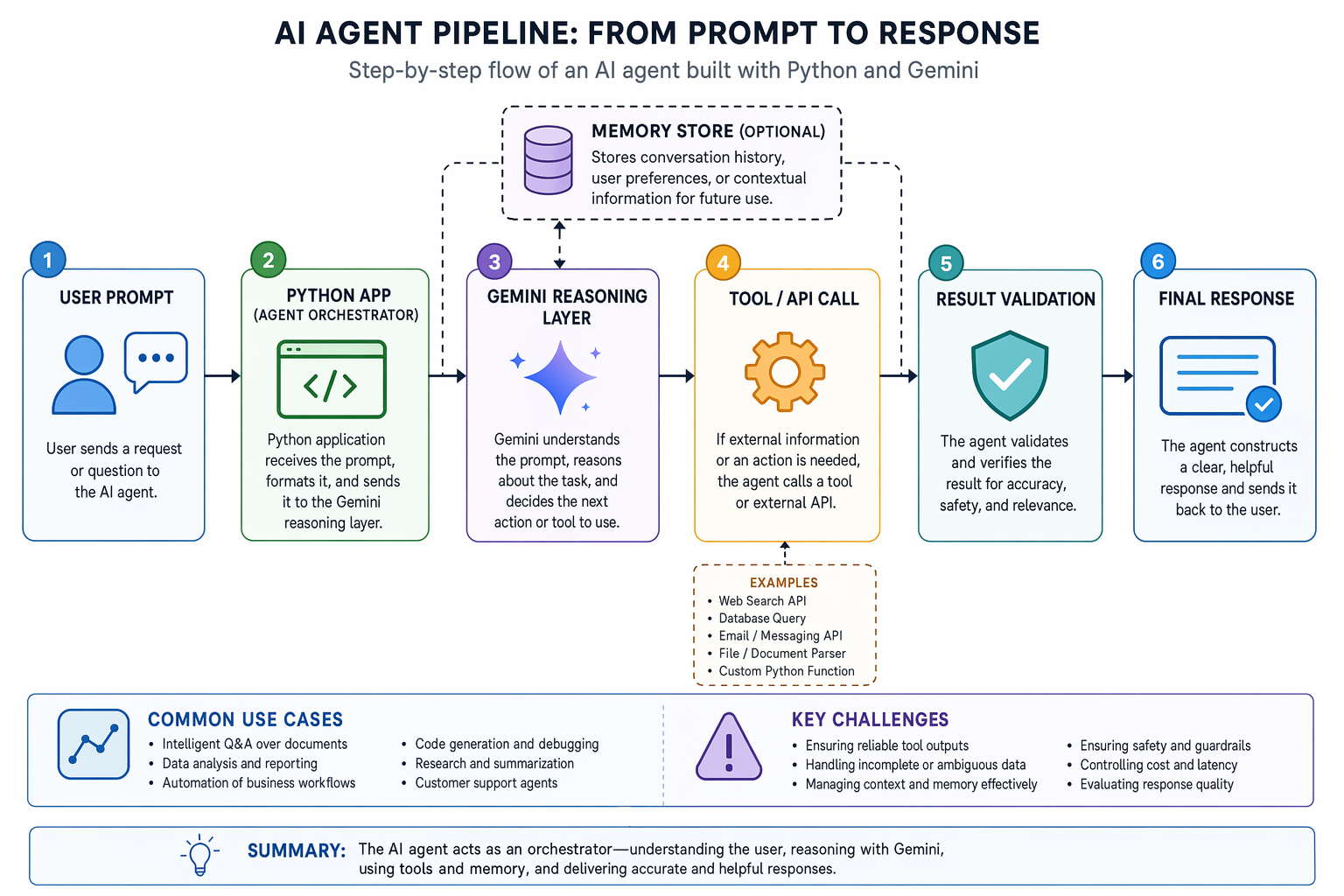
Building a simple AI agent from scratch using Python and Gemini is easier when you break it into a few core parts. At a beginner level, your agent does not need complex planning or multi agent orchestration. It just needs a clear flow: take input, interpret it, decide what to do, use a tool if needed, and return a useful response.
A basic AI agent architecture usually includes:
- User input: the question, task, or command from the user
- Prompt design: instructions that define the agent’s role, tone, and limits
- Gemini API call: the model processes the request and generates the next step
- Tool integration: optional access to a calculator, search function, database, or Python function
- Memory or context: recent conversation history or stored facts
- Output handling: formatting and returning the final answer
In practice, the build process is straightforward. First, set up your Python environment and install the required SDKs. Then configure your Gemini API key securely using environment variables. Instead of stopping at a one shot model.generate_content() call, build the real loop: send the user request to Gemini, let Gemini decide whether a tool is needed, execute the tool in Python, send the tool result back to Gemini, and repeat until the model can answer.
Install the SDK:
pip install google-genai
Set your API key:
export GEMINI_API_KEY="your_api_key_here"
Now create a file called agent.py:
import ast
import json
from typing import Any, Callable

from google import genai
from google.genai import types


MODEL_NAME = "gemini-3-flash-preview"
MAX_AGENT_TURNS = 5

client = genai.Client()


SYSTEM_INSTRUCTION = """
You are a practical Python AI agent.

Your job:
- Understand the user's request.
- Use tools when they are helpful.
- Never invent tool results.
- If a tool fails, explain the failure and ask for the missing input.
- Keep the final answer short and useful.

Available tools:
- calculate: evaluate basic arithmetic.
- lookup_order_status: check a mock order database.
- create_todo: create a todo item in memory.
"""


TOOL_DECLARATIONS = [
    {
        "name": "calculate",
        "description": "Evaluate a basic arithmetic expression. Use only for math.",
        "parameters": {
            "type": "object",
            "properties": {
                "expression": {
                    "type": "string",
                    "description": "A math expression such as '12 * (4 + 3)'.",
                }
            },
            "required": ["expression"],
        },
    },
    {
        "name": "lookup_order_status",
        "description": "Look up the shipping status for an order ID.",
        "parameters": {
            "type": "object",
            "properties": {
                "order_id": {
                    "type": "string",
                    "description": "The order ID, for example 'A1001'.",
                }
            },
            "required": ["order_id"],
        },
    },
    {
        "name": "create_todo",
        "description": "Create a todo item with a priority.",
        "parameters": {
            "type": "object",
            "properties": {
                "title": {
                    "type": "string",
                    "description": "The todo item title.",
                },
                "priority": {
                    "type": "string",
                    "enum": ["low", "medium", "high"],
                    "description": "The todo priority.",
                },
            },
            "required": ["title", "priority"],
        },
    },
]


ORDERS = {
    "A1001": {"status": "shipped", "eta": "2026-04-30"},
    "A1002": {"status": "processing", "eta": "2026-05-02"},
    "A1003": {"status": "delivered", "eta": "2026-04-22"},
}

TODOS: list[dict[str, str]] = []


def calculate(expression: str) -> dict[str, Any]:
    """Safely evaluate simple arithmetic without exposing Python builtins."""
    allowed_nodes = (
        ast.Expression,
        ast.BinOp,
        ast.UnaryOp,
        ast.Constant,
        ast.Add,
        ast.Sub,
        ast.Mult,
        ast.Div,
        ast.FloorDiv,
        ast.Mod,
        ast.Pow,
        ast.USub,
        ast.UAdd,
        ast.Load,
    )

    try:
        tree = ast.parse(expression, mode="eval")
        for node in ast.walk(tree):
            if not isinstance(node, allowed_nodes):
                raise ValueError(f"Unsupported expression element: {type(node).__name__}")
            if isinstance(node, ast.Constant):
                if isinstance(node.value, bool) or not isinstance(node.value, (int, float)):
                    raise ValueError("Only numeric constants are allowed.")

        value = eval(compile(tree, filename="<calculator>", mode="eval"), {"__builtins__": {}}, {})
        return {"ok": True, "value": value}
    except Exception as exc:
        return {"ok": False, "error": str(exc)}


def lookup_order_status(order_id: str) -> dict[str, Any]:
    order = ORDERS.get(order_id.upper())
    if not order:
        return {"ok": False, "error": f"Order {order_id} was not found."}
    return {"ok": True, "order_id": order_id.upper(), **order}


def create_todo(title: str, priority: str) -> dict[str, Any]:
    item = {"title": title, "priority": priority}
    TODOS.append(item)
    return {"ok": True, "todo": item, "total_todos": len(TODOS)}


TOOL_REGISTRY: dict[str, Callable[..., dict[str, Any]]] = {
    "calculate": calculate,
    "lookup_order_status": lookup_order_status,
    "create_todo": create_todo,
}


def build_config() -> types.GenerateContentConfig:
    tools = types.Tool(function_declarations=TOOL_DECLARATIONS)
    return types.GenerateContentConfig(
        system_instruction=SYSTEM_INSTRUCTION,
        tools=[tools],
        automatic_function_calling=types.AutomaticFunctionCallingConfig(disable=True),
    )


def execute_tool(name: str, args: dict[str, Any]) -> dict[str, Any]:
    tool = TOOL_REGISTRY.get(name)
    if not tool:
        return {"ok": False, "error": f"Unknown tool: {name}"}

    try:
        return tool(**args)
    except TypeError as exc:
        return {"ok": False, "error": f"Bad arguments for {name}: {exc}"}
    except Exception as exc:
        return {"ok": False, "error": f"{name} failed: {exc}"}


def ask_agent(user_message: str) -> str:
    config = build_config()
    contents: list[types.Content] = [
        types.Content(role="user", parts=[types.Part(text=user_message)])
    ]

    for turn in range(MAX_AGENT_TURNS):
        response = client.models.generate_content(
            model=MODEL_NAME,
            contents=contents,
            config=config,
        )

        model_content = response.candidates[0].content
        contents.append(model_content)

        function_calls = response.function_calls or []
        if not function_calls:
            return response.text or "I could not produce a final answer."

        for function_call in function_calls:
            tool_name = function_call.name
            tool_args = dict(function_call.args)
            tool_result = execute_tool(tool_name, tool_args)

            print(
                json.dumps(
                    {
                        "turn": turn + 1,
                        "tool": tool_name,
                        "args": tool_args,
                        "result": tool_result,
                    },
                    indent=2,
                )
            )

            contents.append(
                types.Content(
                    role="user",
                    parts=[
                        types.Part.from_function_response(
                            name=tool_name,
                            response=tool_result,
                            id=function_call.id,
                        )
                    ],
                )
            )

    return "I reached the maximum number of tool-calling turns before finishing."


def main() -> None:
    print("AI agent ready. Try: 'What is 18 * 42?' or 'Check order A1002'.")
    print("Type 'exit' to quit.\n")

    while True:
        user_message = input("You: ").strip()
        if user_message.lower() in {"exit", "quit"}:
            break
        if not user_message:
            continue

        answer = ask_agent(user_message)
        print(f"Agent: {answer}\n")


if __name__ == "__main__":
    main()
This example is still small enough to understand, but it has the shape of a real agent. It does not ask Gemini to magically “be an agent.” Python owns the loop, the tools, the error handling, and the state. Gemini owns the language understanding and decides when a tool should be called.
Block 1: Imports, model, and client
import ast
import json
from typing import Any, Callable

from google import genai
from google.genai import types

MODEL_NAME = "gemini-3-flash-preview"
MAX_AGENT_TURNS = 5

client = genai.Client()
This block loads the Python modules, imports the Gemini SDK, chooses a model, and creates the API client. MAX_AGENT_TURNS is a simple safety limit. Without it, a broken prompt or bad tool result could cause the agent to keep asking for tools again and again.
Block 2: The system instruction
SYSTEM_INSTRUCTION = """
You are a practical Python AI agent.

Your job:
- Understand the user's request.
- Use tools when they are helpful.
- Never invent tool results.
- If a tool fails, explain the failure and ask for the missing input.
- Keep the final answer short and useful.
"""
The system instruction defines the agent's behavior. It tells the model when to use tools, how to handle failure, and what kind of final answer to produce. This is more reliable than hiding all behavior inside the user's prompt.
Block 3: Tool declarations
TOOL_DECLARATIONS = [
    {
        "name": "calculate",
        "description": "Evaluate a basic arithmetic expression. Use only for math.",
        "parameters": {
            "type": "object",
            "properties": {
                "expression": {"type": "string"}
            },
            "required": ["expression"],
        },
    }
]
Tool declarations are the contract between Gemini and your Python code. They do not execute anything. They simply tell the model which tools exist, what each tool does, and what arguments each tool requires. In the full code, the same pattern is used for the calculator, order lookup, and todo creation tools.
Block 4: Real Python tools
def lookup_order_status(order_id: str) -> dict[str, Any]:
    order = ORDERS.get(order_id.upper())
    if not order:
        return {"ok": False, "error": f"Order {order_id} was not found."}
    return {"ok": True, "order_id": order_id.upper(), **order}
This is where the work actually happens. The model does not query the order database directly. It asks for a function call, then Python runs the function. In a production app, this function might call Shopify, Stripe, Zendesk, Postgres, or your internal API.
Block 5: Tool registry
TOOL_REGISTRY: dict[str, Callable[..., dict[str, Any]]] = {
    "calculate": calculate,
    "lookup_order_status": lookup_order_status,
    "create_todo": create_todo,
}
The registry maps the tool name requested by Gemini to the Python function you trust. This keeps tool execution explicit. If the model asks for a function that is not registered, your code rejects it instead of trying to run arbitrary code.
Block 6: Gemini configuration
def build_config() -> types.GenerateContentConfig:
    tools = types.Tool(function_declarations=TOOL_DECLARATIONS)
    return types.GenerateContentConfig(
        system_instruction=SYSTEM_INSTRUCTION,
        tools=[tools],
        automatic_function_calling=types.AutomaticFunctionCallingConfig(disable=True),
    )
This config gives Gemini the tool schemas. automatic_function_calling is disabled on purpose. The SDK can call Python functions automatically in some setups, but disabling it makes the agent loop easier to learn because you can see every step: model request, tool call, Python execution, tool result, final answer.
Block 7: Tool execution wrapper
def execute_tool(name: str, args: dict[str, Any]) -> dict[str, Any]:
    tool = TOOL_REGISTRY.get(name)
    if not tool:
        return {"ok": False, "error": f"Unknown tool: {name}"}

    try:
        return tool(**args)
    except TypeError as exc:
        return {"ok": False, "error": f"Bad arguments for {name}: {exc}"}
The wrapper is a guardrail. It catches unknown tools, bad arguments, and tool failures. Instead of crashing the app, it returns a structured error that Gemini can read and explain to the user.
Block 8: The actual agent loop
for turn in range(MAX_AGENT_TURNS):
    response = client.models.generate_content(
        model=MODEL_NAME,
        contents=contents,
        config=config,
    )

    model_content = response.candidates[0].content
    contents.append(model_content)

    function_calls = response.function_calls or []
    if not function_calls:
        return response.text or "I could not produce a final answer."
This is the core loop. Each turn sends the conversation history to Gemini. If Gemini returns normal text, the agent is done. If Gemini returns one or more function calls, Python executes them and continues.
Block 9: Sending tool results back to Gemini
contents.append(
    types.Content(
        role="user",
        parts=[
            types.Part.from_function_response(
                name=tool_name,
                response=tool_result,
                id=function_call.id,
            )
        ],
    )
)
After Python runs a tool, the result is added back into the conversation as a structured function response. The matching function call id is included so the model can connect the result to the exact tool request. Then the loop calls Gemini again, now with the tool result in context.
The flow looks like this:
- User asks: "What is 18 * 42?"
- Gemini replies with a
calculatefunction call. - Python runs
calculate(expression="18 * 42"). - Python sends
{"ok": true, "value": 756}back to Gemini. - Gemini produces the final answer: "18 * 42 is 756."
This is where prompt engineering for AI agents becomes important. Your prompt tells the agent how to behave. For example, you can instruct it to act as a customer support assistant, a research helper, or a scheduling bot. You can also add constraints such as:
- “Do not guess if information is missing”
- “Ask a follow up question when the request is unclear”
- “Use tools only when necessary”
These instructions improve consistency and reduce low quality outputs.
Next, add basic tool use. For example, if the model detects a math problem, your Python app can call a calculator function. If the user asks for product availability, the agent can query a database. If they need current information, it can trigger a search function. This is what makes an agent more useful than a chatbot alone.
Even a first prototype should include logging, testing, and guardrails. Log prompts, tool calls, and outputs so you can debug failures. Test common user scenarios and edge cases. Add guardrails to block unsafe actions, limit tool access, and handle invalid input. According to industry surveys, poor monitoring and weak controls are among the top reasons early AI projects fail in production. Starting with these basics helps you build a Python AI agent with Gemini that is simple, reliable, and ready to improve over time.
Practical Use Cases for AI Agents Built with Python and Gemini
One of the best ways to understand the value of an AI agent built with Python and Gemini is to look at practical use cases you can prototype quickly. For beginners, the goal is not to build a fully autonomous system on day one. It is to solve a small, useful problem and improve it over time.
A strong starting point is customer support automation. An AI agent can read incoming tickets, summarize the issue, suggest a reply, and route the request to the right team. For example, a Python based workflow can pull messages from a help desk, send the content to Gemini for classification, and return labels such as billing, technical issue, or refund request. This can reduce manual triage time and help support teams respond faster. Since many customers expect quick replies, even a simple support assistant can create immediate value.
Another popular use case is research and productivity. A Python AI agent with Gemini can collect information from web pages, internal documents, or spreadsheets, then summarize key findings into clear notes. This is useful for students, marketers, analysts, and founders who need fast overviews without reading every source in full. You can also build an agent that organizes notes by topic, extracts action items, and creates short daily briefings.
For technical users, developer assistants are especially practical. These agents can explain unfamiliar code, generate starter snippets, write documentation, or automate repetitive tasks such as log analysis and test case creation. A beginner friendly example is an agent that reviews a Python function and asks Gemini to suggest cleaner variable names or identify possible bugs. This makes AI agents useful not only for writing code, but also for improving development workflows.
Businesses can also use AI agents for internal automation. Common examples include:
- Drafting routine emails
- Generating weekly reports from structured data
- Answering internal FAQ questions
- Summarizing meeting notes for teams
Finally, personal AI assistants can help with scheduling, reminders, and task prioritization. For example, an agent can review your to do list, rank tasks by urgency, and draft a suggested plan for the day. In most cases, a human in the loop approach works best, where the agent recommends actions and the user approves them before anything is sent or scheduled.
These examples show why building AI agents with Python and Gemini is such a practical skill: you can start small, solve real problems, and expand your agent as your confidence grows.
Common Challenges, Limitations, and Best Practices for Beginners
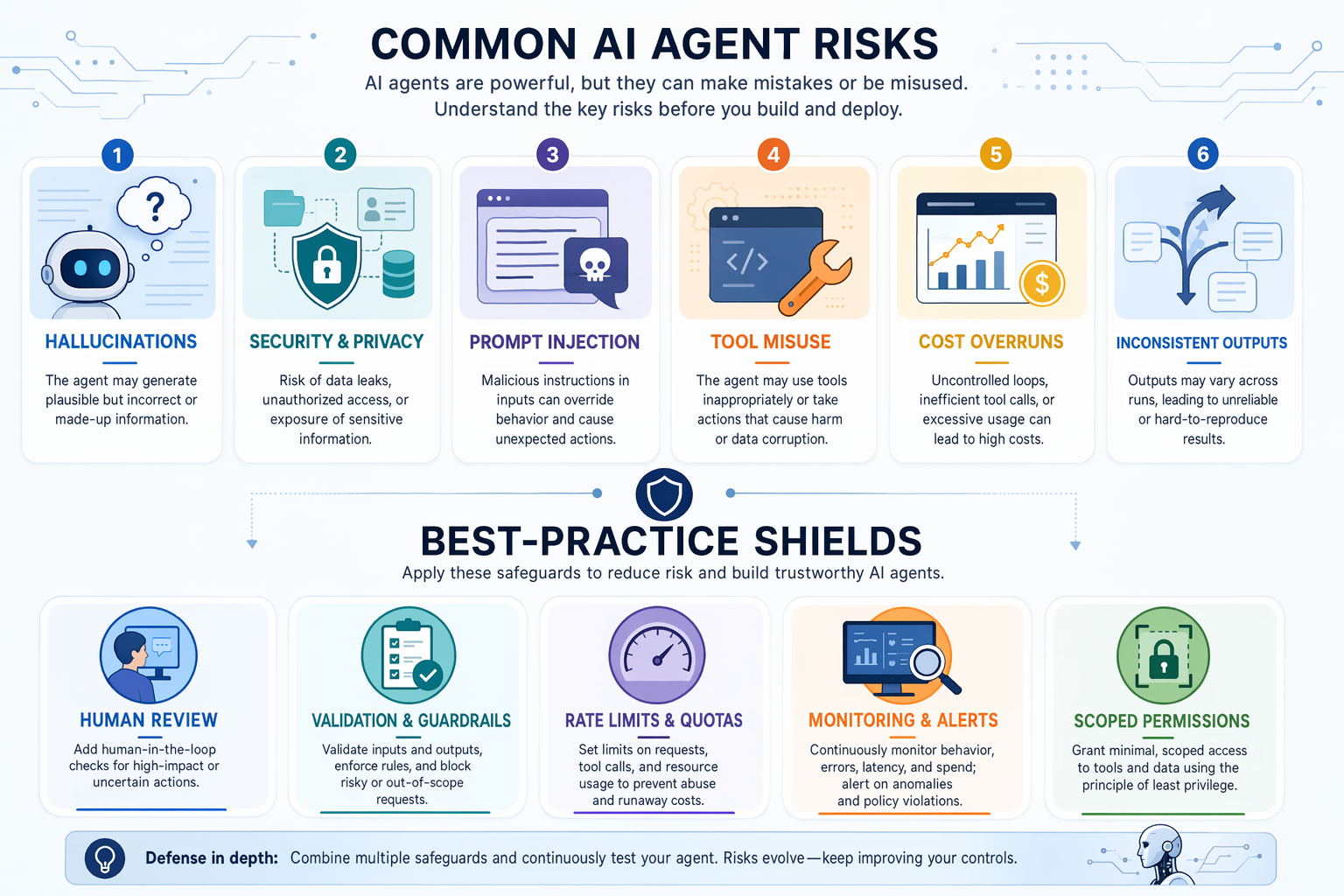
Building an AI agent with Python and Gemini is exciting, but beginners often discover that the hardest part is not getting the agent to run, it is getting it to run reliably, safely, and affordably. Even a simple agent can fail in ways that look convincing on the surface.
One of the most common issues is hallucination. An agent may generate an answer that sounds correct but includes made up facts, wrong calculations, or nonexistent sources. Another frequent problem is incorrect tool use. For example, an agent might call the wrong API, pass poorly formatted parameters, or misread a database result and continue as if everything worked. You may also notice inconsistent responses: the same prompt can produce different outputs across runs, especially when the task is vague or requires multiple reasoning steps.
These risks increase when agents interact with real systems. If your Python AI agent can access customer records, internal documents, email, or third party apps, then privacy, security, and permission control become essential. A beginner mistake is giving an agent broad access “just in case.” Instead, use the principle of least privilege: only allow the minimum tools and data needed for the task. If an agent only needs to read calendar events, it should not also be able to send emails or delete files.
Cost and speed are also easy to underestimate. A single user request may trigger several model calls, tool calls, retries, and validation steps. That can increase both latency and API cost quickly. Industry benchmarks often show that users begin to notice delays once response times move beyond a few seconds, so inefficient workflows can hurt adoption even if the agent is technically accurate.
To reduce these problems, apply a few practical guardrails:
- Keep a human in the loop for high impact actions like sending messages, approving refunds, or updating records
- Validate outputs with rules, schemas, or simple checks before taking action
- Limit tool access to only what the agent truly needs
- Log decisions and tool calls so you can debug failures
- Add fallback behavior when the model is uncertain or a tool fails
The best approach is to start narrow. Build an AI agent for one clear workflow, such as summarizing support tickets or drafting internal reports. Measure useful metrics like accuracy, completion rate, cost per task, and average response time. Then iterate gradually. This is how beginners move from a demo to a more dependable AI agent using Python and Gemini without over automating too soon.
Conclusion
Key Takeaways:
- AI agents combine reasoning, memory, and tool use to go beyond basic chat interactions
- Python and Gemini offer a beginner friendly path to building simple agents from scratch
- Useful early projects include support, research, productivity, and automation workflows
- Success depends on guardrails, testing, and a realistic understanding of current limitations
Start with a small Python and Gemini prototype for one narrow task, then improve it step by step with better prompts, tools, and safety checks.
Related Topics
Related Resources
The Ultimate AI Learning Roadmap for Software Engineers (2025 Edition)
The line between 'software engineer' and 'AI engineer' is disappearing. Are you prepared for the shift from deterministic coding to orchestrating intelligent, probabilistic systems? This comprehensive AI learning roadmap is designed specifically for software professionals. It's a practical, timeline based guide to not only learn the necessary skills but also leverage your existing engineering expertise to transition into a high impact AI role, covering everything from mathematical foundations to production grade MLOps and Generative AI.
articleThe Agentic Shift: How Autonomous AI Will Redefine Banking, Finance, and Insurance by 2026
By 2026, the financial services industry will cross a critical threshold, moving beyond the era of AI that merely suggests to one where AI autonomously acts. This comprehensive analysis explores the impending transition from Generative to Agentic AI in the BFSI sector. We will dissect the multi trillion dollar economic impact, explore production grade use cases, and confront the profound strategic, compliance, and systemic risks that autonomous agents introduce, providing a C suite playbook for navigating this new reality.
articleHow Evals Forge Aligned and High-Performing AI
While the world marvels at the creative and analytical prowess of large language models, the silent, rigorous work of evaluation is what stands between a groundbreaking AI assistant and a high-profile catastrophic failure. This deep dive moves beyond the surface-level understanding of AI testing. We will explore how 'evals' have evolved from a final pre-deployment checkmark into the continuous, dynamic backend of AI alignment and performance engineering. For expert practitioners, this is the definitive guide to mastering the discipline of evaluation to build safer, more reliable, and truly intelligent AI systems.